> ## Documentation Index
> Fetch the complete documentation index at: https://docs.guhan.ai/llms.txt
> Use this file to discover all available pages before exploring further.
# Guhan Chrome extension
> Add people to Guhan from LinkedIn without leaving the page. See who's already in Guhan, add people to a List, import a search, and enrich them after adding.
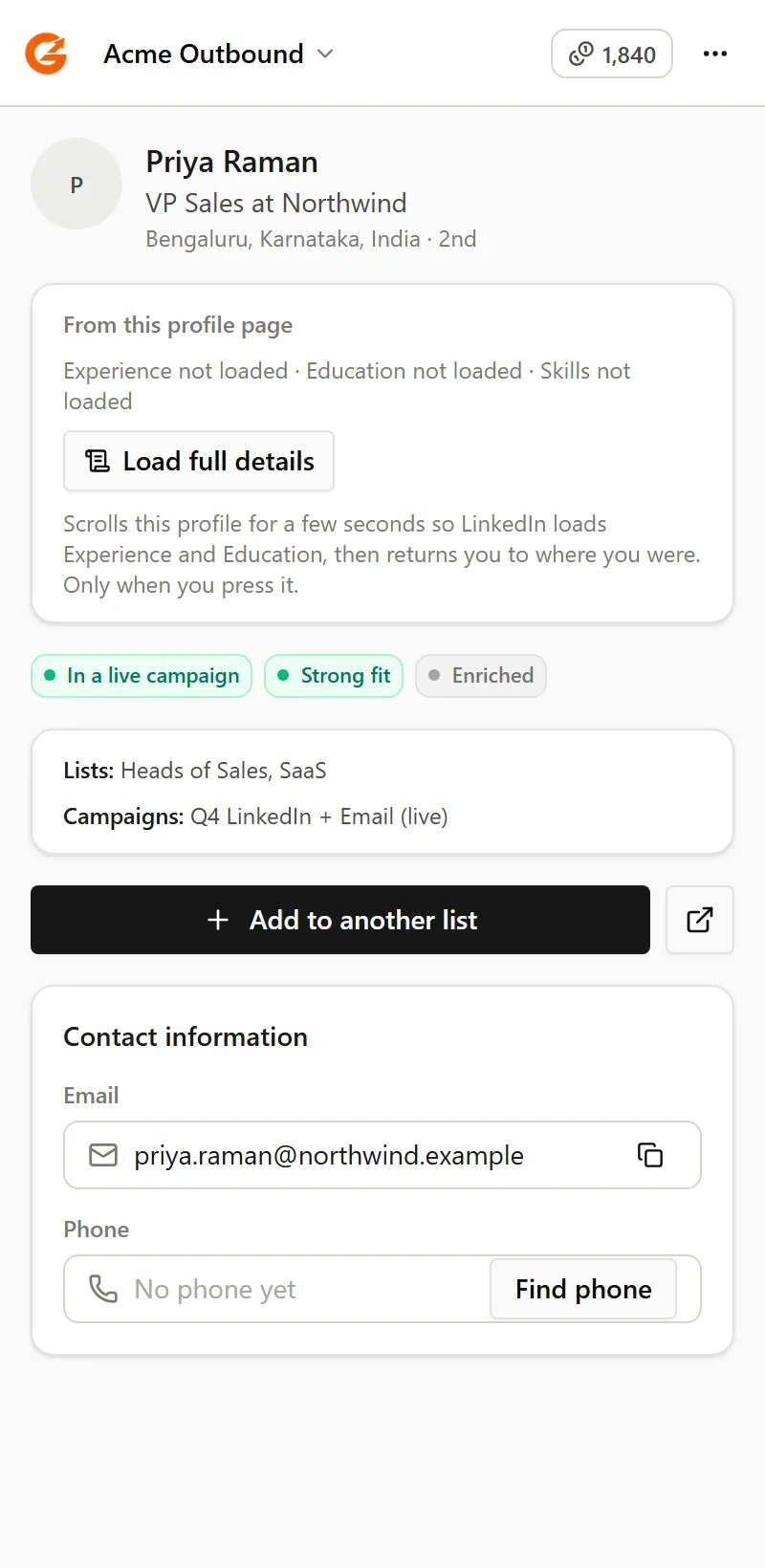
**The Guhan Chrome extension puts Guhan beside LinkedIn.** Open a profile, a people search, a company page or an event, and a panel shows who is already in your workspace and lets you add people to a List in a click. What happens next (messages, follow-ups, replies) runs from Guhan, as usual.
 ## What you can do
Every profile and search result shows whether the person is new, on a List, in a live Campaign, has replied, or is marked Do Not Contact.
One person from their profile, or many from a search. Active Campaigns pick them up automatically.
Choose how many people to add, up to 999, and Guhan goes through the result pages for you.
Load a profile's Experience and Education so the job title and company come with the person.
Optionally add work email, phone, a research brief and more. The exact cost is shown first.
Import a company's employees, an event's attendees, or your own followers and following.
## Read-only on LinkedIn
The extension only reads. It never sends a message, an invite, a comment or a follow on LinkedIn. Everything you send goes out from Guhan, through your [sender accounts](/get-started/sender-accounts/overview) and their [sending limits](/campaigns/sending-safety). See [Safety and troubleshooting](/chrome-extension/safety-and-troubleshooting).
## Related
Install the extension and connect your account.
Find people from the Prospects page with a search, a signal or a CSV.
This documentation is built and hosted on [Mintlify](https://mintlify.com), a developer documentation platform.
## What you can do
Every profile and search result shows whether the person is new, on a List, in a live Campaign, has replied, or is marked Do Not Contact.
One person from their profile, or many from a search. Active Campaigns pick them up automatically.
Choose how many people to add, up to 999, and Guhan goes through the result pages for you.
Load a profile's Experience and Education so the job title and company come with the person.
Optionally add work email, phone, a research brief and more. The exact cost is shown first.
Import a company's employees, an event's attendees, or your own followers and following.
## Read-only on LinkedIn
The extension only reads. It never sends a message, an invite, a comment or a follow on LinkedIn. Everything you send goes out from Guhan, through your [sender accounts](/get-started/sender-accounts/overview) and their [sending limits](/campaigns/sending-safety). See [Safety and troubleshooting](/chrome-extension/safety-and-troubleshooting).
## Related
Install the extension and connect your account.
Find people from the Prospects page with a search, a signal or a CSV.
This documentation is built and hosted on [Mintlify](https://mintlify.com), a developer documentation platform.