

How signals work
- One signal per source. Each List source runs a single signal.
- Two kinds.
- Person signals find people directly: someone who wrote, commented on or was tagged in a post. Your Who fits rules then filter those people. In the signal’s form they sit under Narrow by who fits (optional), which stays collapsed until you open it.
- Company signals find companies first (funded, hiring, new executive, uses a technology), then look for people at those companies who match your Who fits rules, such as the right title.
- Schedule. Most signals can run Ongoing or One-time.
- Cost. You are charged per profile a run finds, before your filters are applied. See How prospects get added. Technology adoption has extra charges, listed below.
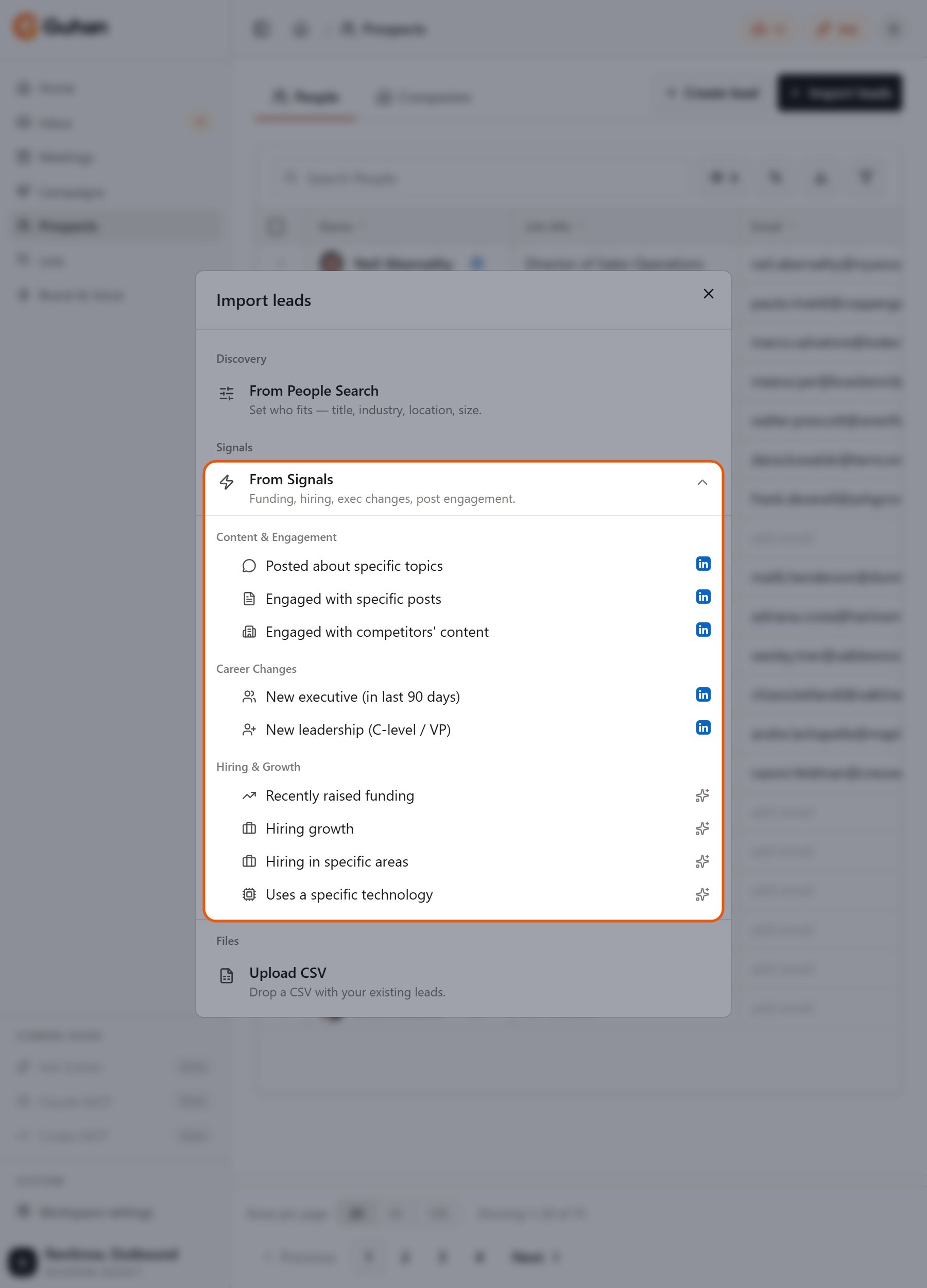
From Signals in Import leads: the nine signals, in the same three groups as this page
Content and engagement
Posted about specific topics
People who wrote, engaged with, or were tagged in LinkedIn posts that match your keywords. You configure- Keywords: one or more words or phrases, added as tags. Pain language such as “struggling with” or “what tool do you use” works well.
- People to import (pick any combination): Authors (people who wrote the post), Engagers (people who liked or commented), Mentioned (people tagged inside the post). Authors and Engagers are ticked by default.
- Engagement type (when Engagers is selected): Commenters only (the default; higher intent) or Commenters + reactions (more volume, lower intent).
- In One-time mode: a time window (past day, past week or past month) and a maximum number of posts per keyword.
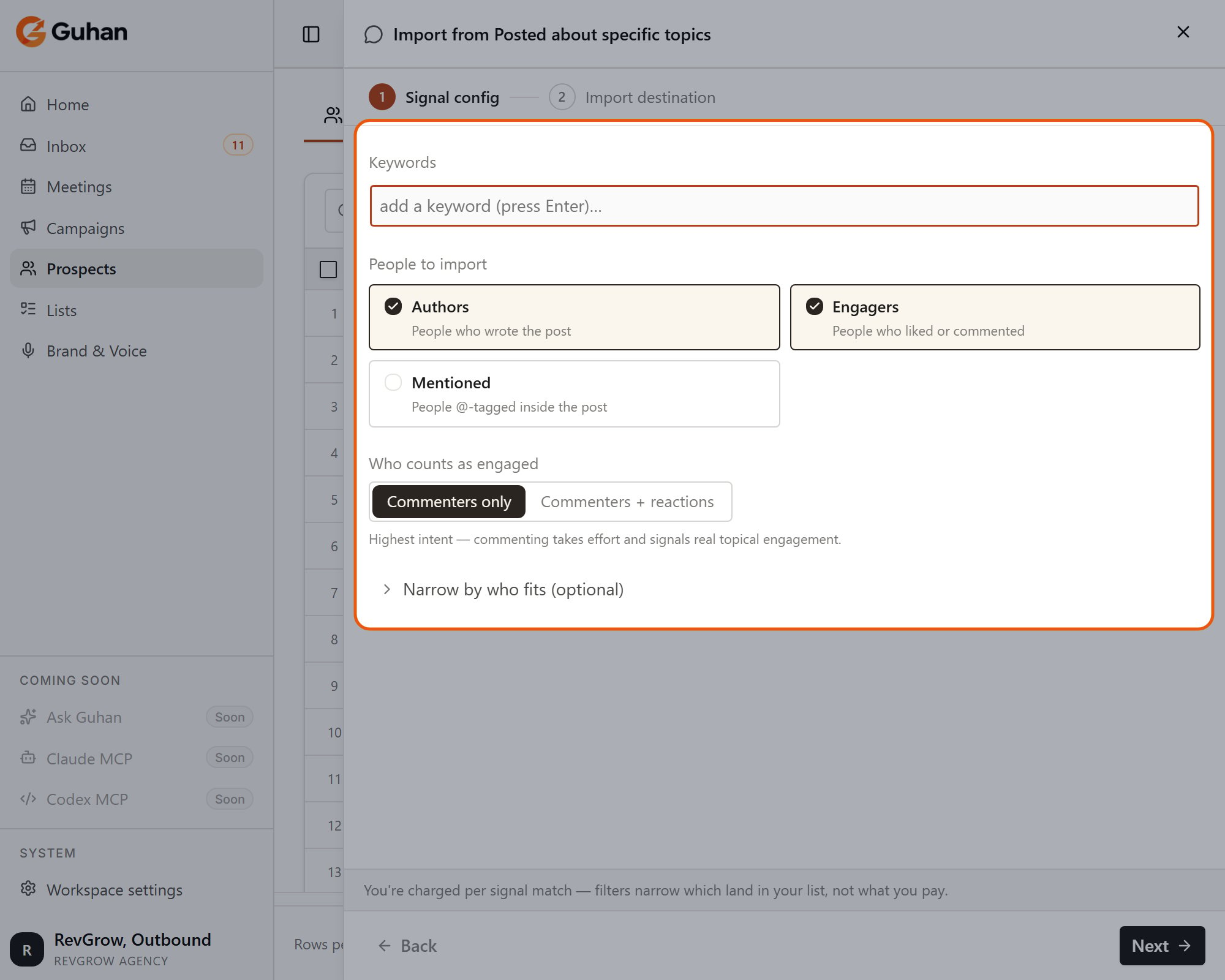
Posted about specific topics: keywords, who to import and who counts as engaged. The other two post signals offer the same People to import and engagement choices
Engaged with specific posts
People who reacted to or commented on LinkedIn posts you choose, such as your own post, a thought leader’s, or a competitor’s. You configure- Post URLs: paste each post’s URL.
- People to import: Engagers (default) and/or Mentioned.
- Engagement type: Commenters only (default) or Commenters + reactions.
Engaged with competitors’ content
People who engaged with, or were tagged in, posts published by a competitor. You configure- Competitor URLs: a LinkedIn company URL (watches posts from that company page) or an individual profile URL (for example a competitor’s CEO).
- People to import: Engagers (default) and/or Mentioned.
- Engagement type: Commenters only (default) or Commenters + reactions.
- In One-time mode: a time window (last 24 hours, 7 days, 30 days, 3 months, 6 months or 1 year) and a maximum number of posts per source.
Career changes
These two signals take company URLs, so the companies are already chosen. Because of that, the company-side Who fits rules (industry, company HQ, headcount) are hidden and not applied. Title, seniority and location rules still apply.New executive (in last 90 days)
People who joined one of your chosen companies as an executive or director in the last 90 days. You configure- Company URLs: the LinkedIn company pages to watch.
New leadership (C-level / VP)
The same, narrowed to senior leadership. You configure- Company URLs: the LinkedIn company pages to watch.
Hiring and growth
These are company signals. Your Who fits rules pick the right person at each company that triggers.Recently raised funding
Companies that announced a funding round on LinkedIn in the last 90 days. You configure: nothing beyond turning it on. The 90-day window is fixed. Tip: pair it with titles for the people who control the new budget, such as finance, operations or revenue operations.Hiring growth
Companies whose headcount grew by at least a percentage you choose over a period you choose. You configure- Min headcount growth (%): 1 to 500 (starts at 20).
- Over the last: 1, 3, 6 or 12 months (starts at 6).
Hiring in specific areas
Companies with open LinkedIn job postings in the functions you pick, from the last 30 days. You configure- Job functions: choose from a list such as Sales, Engineering, Marketing, Product Management, Customer Support, Finance, Human Resources and Operations.
- Industry and region come from your Who fits rules automatically.
Uses a specific technology
Companies that use technologies you name, such as Shopify, HubSpot or Snowflake. LinkedIn does not expose tech stacks reliably, so this signal uses a separate data source. You configure- Technologies: search and pick from the suggestions. You can type a name that is not suggested, but it is flagged because it may not match anything.
Combining signals
A source runs one signal, so to combine signals, create a List for each. A person who appears in more than one List is still one person in your workspace. Guhan recognises them and does not create a duplicate.No signal at all
You can skip signals and use From People Search alone. You get a steady stream of people who match your criteria, without the “why now” trigger.Related
Import leads
Set up a source and choose Ongoing or One-time.
How prospects get added
What happens after a signal fires and what you pay.