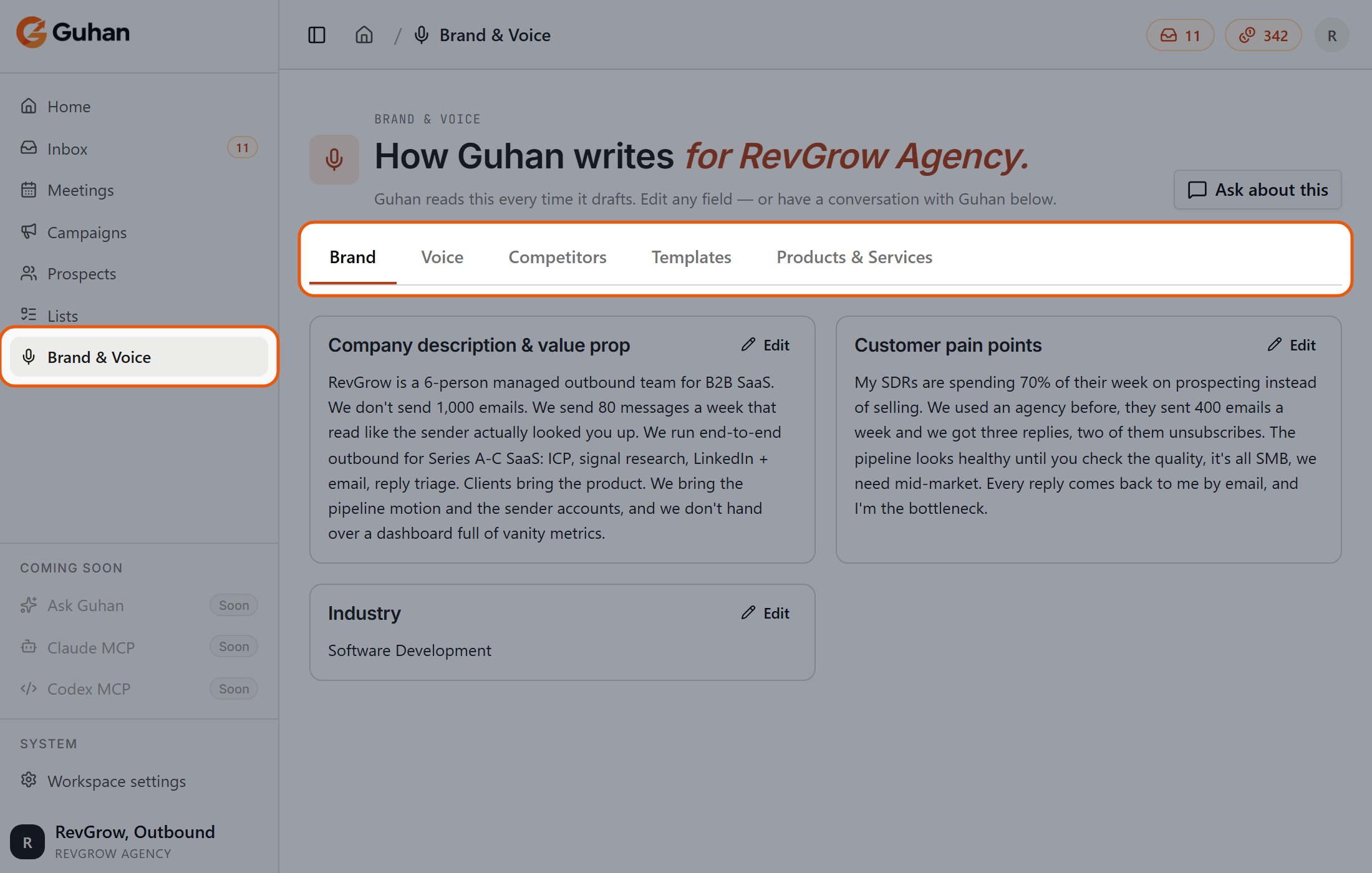
Fill in Brand & Voice (how you sound) and Products (what you sell and why it matters). This is the context behind every message Guhan writes.
Brand & Voice is in the sidebar. Its five tabs hold how you sound and what you sell: Brand, Voice, Competitors, Templates and Products & Services
2
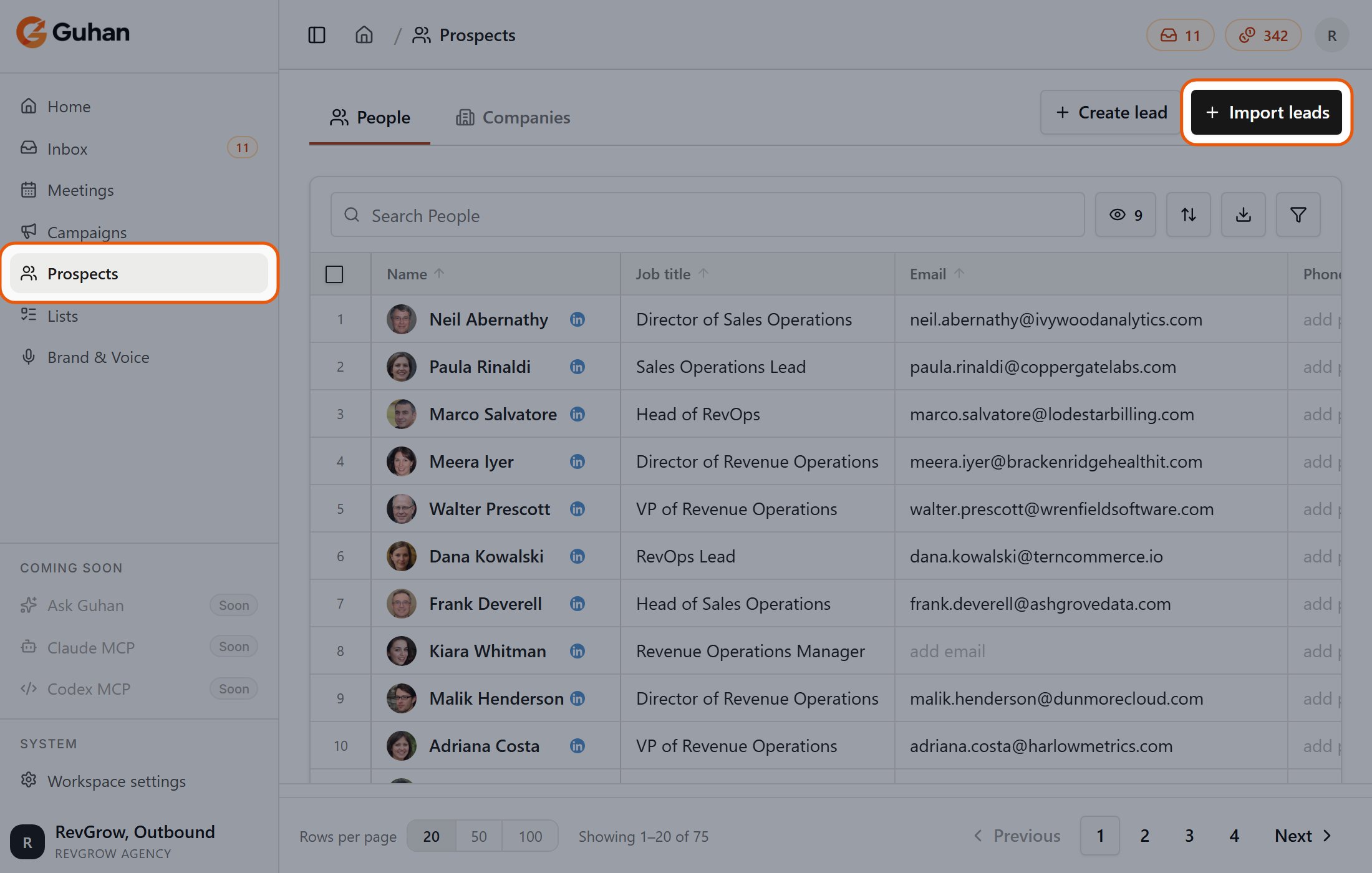
Import leads
Open Prospects and click Import leads. Find people with a search (optionally narrowed by a buying signal like funding or hiring), upload a CSV, or add someone by hand. Everyone is added to a List, a group of prospects you can review and point a Campaign at. As prospects are added, Guhan researches them and marks how well they fit.
Prospects is in the sidebar, and Import leads is at the top right of the page
3
Run a Campaign
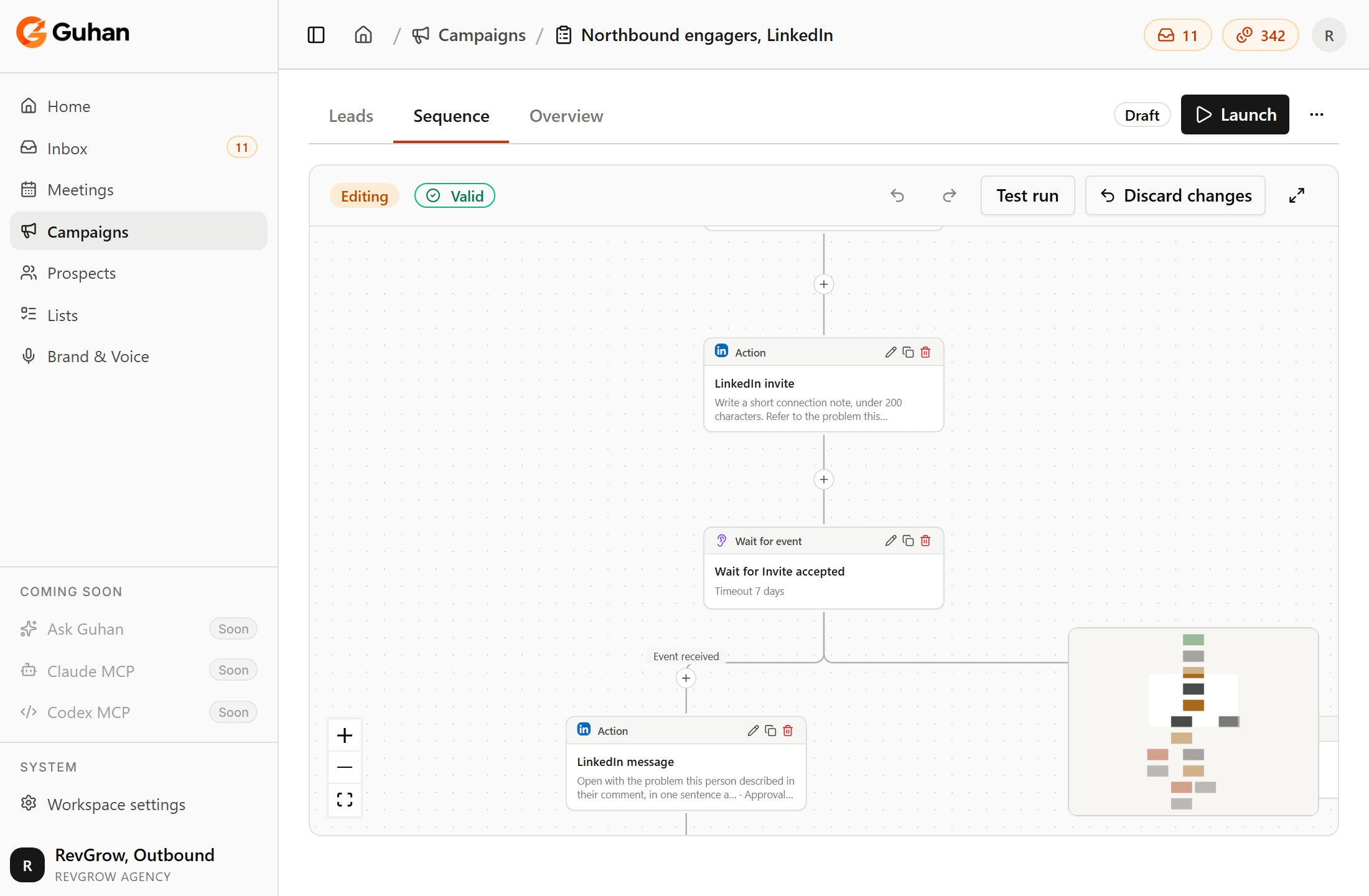
A Campaign points at one or more Lists and runs a sequence — for example a LinkedIn invite, a wait, a DM, then an email. Each message is drafted for the individual prospect from your brief, their profile, and the signal that brought them in. Campaigns send from the sender accounts you connect.
Campaigns is in the sidebar. A campaign's Sequence tab is the editor: a LinkedIn invite, a wait for acceptance, a message, then a wait for a reply
4
Handle replies
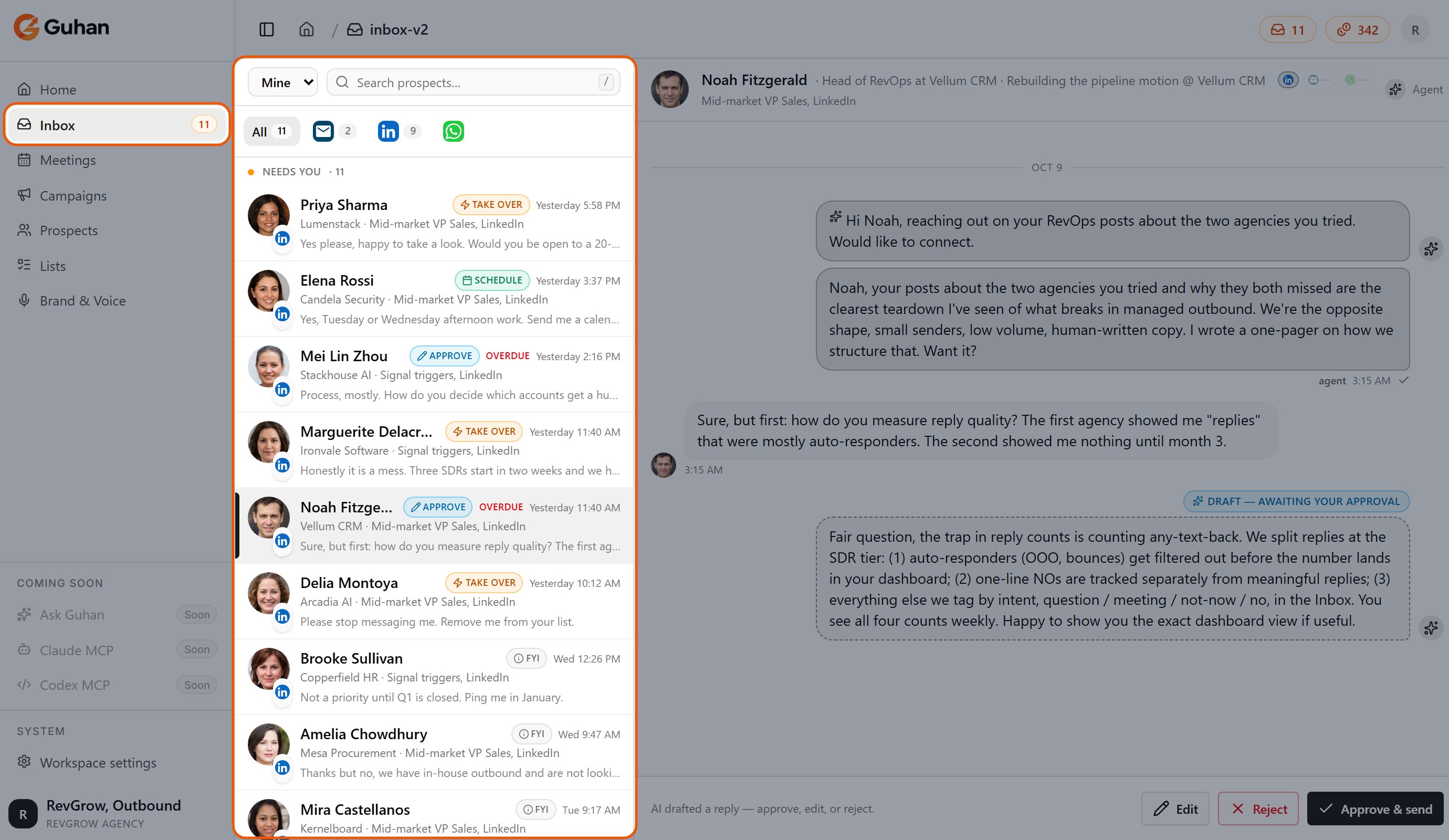
Replies arrive in your Inbox. Guhan classifies each one, and your reply rules decide what happens next: hand it to a person, draft a response for you to approve, or answer automatically. Meeting requests always go to a person.
The Inbox is in the sidebar. Replies are grouped by what needs you, each tagged with its next step, and the open conversation is on the right
5
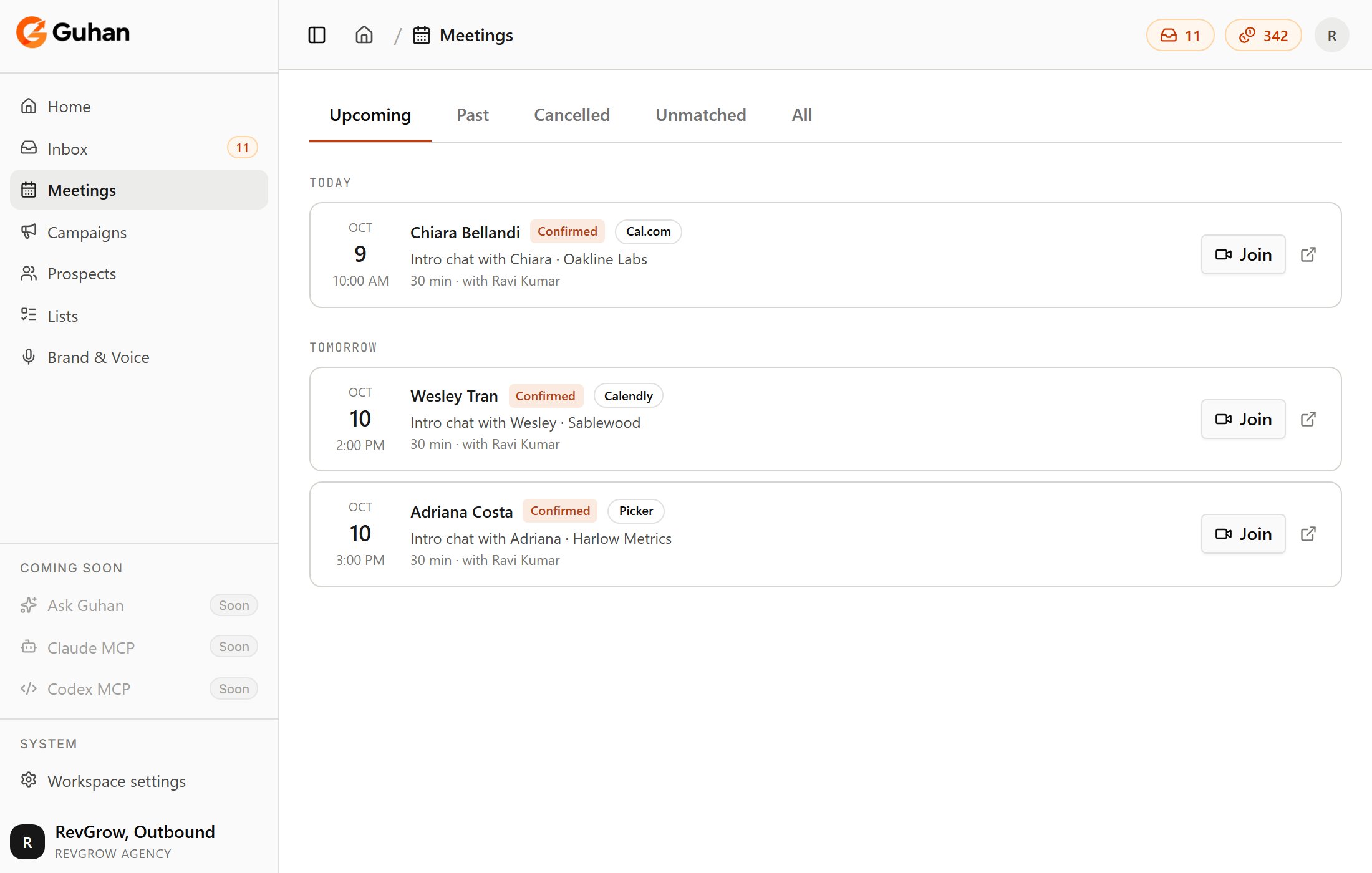
Book meetings
Connect a calendar, and Guhan shares your booking link when someone is ready. Booked calls appear under Meetings.
Meetings is in the sidebar. Booked calls are grouped by day, with how each was booked
You sell an analytics tool to VPs of Marketing at SaaS companies.
You import leads from the Prospects page with a signal source for VP of Marketing at SaaS companies with 50–500 employees who posted about attribution. New matches are added to your List as Guhan finds them.
Your Campaign uses that List and runs an invite, a DM, and a follow-up email, each written around the post that person shared.
You open Guhan, check the Inbox, and take the conversations worth taking.
Finding and enriching prospects, writing messages, and revealing contact details use credits. Sending itself is free, but it’s governed by daily limits that protect your accounts. See Plans and credits for what costs what, and Sending safety for the limits.
{"docsConfig":{"theme":"mint","$schema":"https://mintlify.com/docs.json","name":"Guhan","description":"Guhan is an AI SDR — a Sales Development Representative that runs the full outbound workflow: learns your business, finds fit prospects, researches every one, drafts hyper-personalized outreach across LinkedIn, Email, and WhatsApp, handles replies, and books meetings for the sales team.","colors":{"primary":"#EA580C","light":"#FB923C","dark":"#C2410C"},"logo":{"light":"https://mintcdn.com/guhan/86NRPSItwy-XKHHH/logo/guhan-logo.webp?fit=max\u0026auto=format\u0026n=86NRPSItwy-XKHHH\u0026q=85\u0026s=32cb8c4b5a6074c22f2d95bf2043b07e","dark":"https://mintcdn.com/guhan/lKN7luO_SLqydmqp/logo/guhan_horizontal_transparent.png?fit=max\u0026auto=format\u0026n=lKN7luO_SLqydmqp\u0026q=85\u0026s=d54f80f22d421c0b7e6c2351e46b876b"},"favicon":"https://mintcdn.com/guhan/fvATTrWQ6CYVCCqT/favicon.ico?fit=max\u0026auto=format\u0026n=fvATTrWQ6CYVCCqT\u0026q=85\u0026s=090cf06a818931d3c4b7b5d896ef7b2a","navbar":{"links":[{"href":"mailto:hello@guhan.ai","label":"Support"}],"primary":{"type":"button","label":"Launch app","href":"https://guhan.ai"}},"footer":{"socials":{"linkedin":"https://linkedin.com/company/guhanai"}},"seo":{"metatags":{"canonical":"https://docs.guhan.ai","description":"Guhan is an AI SDR — the same role as a human Sales Development Representative embedded on your team, just executed in software. It learns your business, finds fit prospects, researches every one, drafts hyper-personalized outreach across LinkedIn, Email, and WhatsApp, handles replies, and books meetings.","keywords":"Guhan, AI SDR, AI Sales Development Representative, autonomous AI sales agent, AI sales agent, outbound sales, intent-based prospecting, buying signals, hyper-personalized outreach, LinkedIn automation, cold email AI, WhatsApp outreach, multi-channel sales, sales automation, sales prospecting tool, B2B lead generation, AI personalization, sales pipeline automation, signal-based sales lists, smart prospect lists","og:title":"Guhan Docs — AI SDR for LinkedIn, Email, WhatsApp","og:description":"Guhan is an AI SDR that learns your business, finds fit prospects, researches every one, drafts hyper-personalized outreach across LinkedIn, Email, and WhatsApp, and books meetings — so your pipeline grows without manual SDR work.","og:site_name":"Guhan AI","og:type":"website","og:url":"https://docs.guhan.ai","og:image":"https://guhan.ai/logos/guhan-logo.webp","twitter:card":"summary_large_image","twitter:title":"Guhan Docs — AI SDR for LinkedIn, Email, WhatsApp","twitter:description":"AI SDR that learns your business, finds fit prospects, researches every one, drafts hyper-personalized outreach across LinkedIn, Email, and WhatsApp, and books meetings.","twitter:image":"https://guhan.ai/logos/guhan-logo.webp","robots":"index, follow","author":"Guhan AI","theme-color":"#EA580C"},"indexing":"navigable"},"styling":{"latex":true},"navigation":{"global":{"anchors":[{"anchor":"Launch app","icon":"arrow-up-right-from-square","href":"https://guhan.ai"},{"anchor":"Contact","icon":"envelope","href":"mailto:hello@guhan.ai"}]},"pages":[]}},"deployment":{"deploymentMetadataValue":{"subdomain":"guhan","hasAudioNarration":false,"actualSubdomain":"guhan","customDomains":["docs.guhan.ai"],"gitSource":{"type":"github","owner":"guhanai","repo":"docs","deployBranch":"main","contentDirectory":"","isPrivate":false,"mountPath":"","label":""},"chroma":{"collectionId":"ab393200-2da7-4dfb-84b1-f0432e7c4566","liveDeploymentHistoryId":"6adf82d4f325da4ba4e1adc8","schemaVersion":"v3","latestBuiltDeploymentHistoryId":"6adf82d4f325da4ba4e1adc8"},"entitlements":{"AI_CHAT":{"status":"DISABLED"}},"buildId":"6adf82d4f325da4ba4e1adc8","clientVersion":"0.0.4044","searchFilterCounts":[{"language":"default","tag":"Documentation","count":39},{"language":"default","tag":"Get started","count":9},{"language":"default","tag":"Find prospects","count":8},{"language":"default","tag":"Chrome extension","count":6},{"language":"default","tag":"Run campaigns","count":5},{"language":"default","tag":"Help","count":5},{"language":"default","tag":"Replies and meetings","count":5},{"language":"default","tag":"Account","count":5},{"language":"default","tag":"Brand \u0026 Voice","count":4},{"language":"default","tag":"Sender accounts","count":4}]},"assistantConfig":{"enableAskAiButton":false,"enableStarterQuestions":false,"enableContextualStarterQuestions":false,"enableAskAiSearchBar":true},"basePath":"","hasChatPermissions":false,"hasWebMcpPermissions":false,"toggles":[{"name":"kill-isr","enabled":true,"variant":{"name":"disabled","enabled":false,"feature_enabled":true},"impressionData":false},{"name":"agent-mintlify-slack","enabled":true,"variant":{"name":"disabled","enabled":false,"feature_enabled":true},"impressionData":false},{"name":"agent-integrations-settings","enabled":true,"variant":{"name":"disabled","enabled":false,"feature_enabled":true},"impressionData":false},{"name":"automations-pr-grouping","enabled":true,"variant":{"name":"disabled","enabled":false,"feature_enabled":true},"impressionData":false},{"name":"custom-prefix","enabled":true,"variant":{"name":"disabled","enabled":false,"feature_enabled":true},"impressionData":false},{"name":"analytics-v7","enabled":true,"variant":{"name":"disabled","enabled":false,"feature_enabled":true},"impressionData":false},{"name":"user-flows-analytics","enabled":true,"variant":{"name":"disabled","enabled":false,"feature_enabled":true},"impressionData":false},{"name":"no-publish-flow","enabled":true,"variant":{"name":"disabled","enabled":false,"feature_enabled":true},"impressionData":false},{"name":"workos-onboarding","enabled":true,"variant":{"name":"disabled","enabled":false,"feature_enabled":true},"impressionData":false},{"name":"llms-txt-v2","enabled":true,"variant":{"name":"disabled","enabled":false,"feature_enabled":true},"impressionData":false},{"name":"snapshot-serving-live","enabled":true,"variant":{"name":"disabled","enabled":false,"feature_enabled":true},"impressionData":false},{"name":"stripTemperatureMiddleware","enabled":true,"variant":{"name":"disabled","enabled":false,"feature_enabled":true},"impressionData":false},{"name":"support-platform-pylon-zendesk","enabled":true,"variant":{"name":"disabled","enabled":false,"feature_enabled":true},"impressionData":false},{"name":"snapshot-serving","enabled":true,"variant":{"name":"disabled","enabled":false,"feature_enabled":true},"impressionData":false},{"name":"instant-rollback","enabled":true,"variant":{"name":"disabled","enabled":false,"feature_enabled":true},"impressionData":false},{"name":"granular-notifications-server","enabled":true,"variant":{"name":"disabled","enabled":false,"feature_enabled":true},"impressionData":false},{"name":"granular-notifications","enabled":true,"variant":{"name":"disabled","enabled":false,"feature_enabled":true},"impressionData":false},{"name":"automations-fable","enabled":true,"variant":{"name":"disabled","enabled":false,"feature_enabled":true},"impressionData":false},{"name":"fixed-ai-action-pricing","enabled":true,"variant":{"name":"disabled","enabled":false,"feature_enabled":true},"impressionData":false},{"name":"automation-resolve-merge-conflict","enabled":true,"variant":{"name":"disabled","enabled":false,"feature_enabled":true},"impressionData":false},{"name":"scoped-publishing","enabled":true,"variant":{"name":"disabled","enabled":false,"feature_enabled":true},"impressionData":false},{"name":"mintql","enabled":true,"variant":{"name":"disabled","enabled":false,"feature_enabled":true},"impressionData":false},{"name":"page-level-analytics","enabled":true,"variant":{"name":"disabled","enabled":false,"feature_enabled":true},"impressionData":false},{"name":"editor-version-history-v2","enabled":true,"variant":{"name":"disabled","enabled":false,"feature_enabled":true},"impressionData":false},{"name":"billing-page-v2","enabled":true,"variant":{"name":"disabled","enabled":false,"feature_enabled":true},"impressionData":false},{"name":"full-page-search","enabled":true,"variant":{"name":"disabled","enabled":false,"feature_enabled":true},"impressionData":false},{"name":"workspace-projects","enabled":true,"variant":{"name":"disabled","enabled":false,"feature_enabled":true},"impressionData":false},{"name":"assistant-v5","enabled":true,"variant":{"name":"disabled","enabled":false,"feature_enabled":true},"impressionData":false},{"name":"byok-sep-25","enabled":true,"variant":{"name":"disabled","enabled":false,"feature_enabled":true},"impressionData":false},{"name":"fork-pr-previews","enabled":true,"variant":{"name":"disabled","enabled":false,"feature_enabled":true},"impressionData":false},{"name":"revalidation-jwt","enabled":true,"variant":{"name":"disabled","enabled":false,"feature_enabled":true},"impressionData":false},{"name":"vite-origin","enabled":true,"variant":{"name":"disabled","enabled":false,"feature_enabled":true},"impressionData":false},{"name":"billing-updated-9-15","enabled":true,"variant":{"name":"disabled","enabled":false,"feature_enabled":true},"impressionData":false},{"name":"workos-sso-scim","enabled":true,"variant":{"name":"disabled","enabled":false,"feature_enabled":true},"impressionData":false},{"name":"hobby-abuse-scan","enabled":true,"variant":{"name":"disabled","enabled":false,"feature_enabled":true},"impressionData":false},{"name":"dashboard-inbox","enabled":true,"variant":{"name":"disabled","enabled":false,"feature_enabled":true},"impressionData":false},{"name":"workos-signup","enabled":true,"variant":{"name":"disabled","enabled":false,"feature_enabled":true},"impressionData":false},{"name":"turbopuffer-dual-write","enabled":true,"variant":{"name":"disabled","enabled":false,"feature_enabled":true},"impressionData":false},{"name":"workos-enabled","enabled":true,"variant":{"name":"disabled","enabled":false,"feature_enabled":true},"impressionData":false},{"name":"approve-review-flow","enabled":true,"variant":{"name":"disabled","enabled":false,"feature_enabled":true},"impressionData":false},{"name":"sso-setup-deadline-banner","enabled":true,"variant":{"name":"disabled","enabled":false,"feature_enabled":true},"impressionData":false}],"googleFontsInlined":false},"customCss":[],"page":{"pagePath":"get-started/how-guhan-works","slug":"/get-started/how-guhan-works","pageMetadata":{"title":"How Guhan works","description":"The whole product in one flow — set up your business context, import leads, run a Campaign, handle replies, book meetings.","href":"/get-started/how-guhan-works"},"description":{"compiledSource":"\"use strict\";\nconst {jsx: _jsx} = arguments[0];\nconst {useMDXComponents: _provideComponents} = arguments[0];\nfunction _createMdxContent(props) {\n const _components = {\n p: \"p\",\n ..._provideComponents(),\n ...props.components\n };\n return _jsx(_components.p, {\n children: \"The whole product in one flow — set up your business context, import leads, run a Campaign, handle replies, book meetings.\"\n });\n}\nfunction MDXContent(props = {}) {\n const {wrapper: MDXLayout} = {\n ..._provideComponents(),\n ...props.components\n };\n return MDXLayout ? _jsx(MDXLayout, {\n ...props,\n children: _jsx(_createMdxContent, {\n ...props\n })\n }) : _createMdxContent(props);\n}\nreturn {\n default: MDXContent\n};\n","frontmatter":{},"scope":{}},"pageType":"default","mdx":{"mdxSource":{"compiledSource":"\"use strict\";const{Fragment:_Fragment,jsx:_jsx,jsxs:_jsxs}=arguments[0];const{useMDXComponents:_provideComponents}=arguments[0];function _createMdxContent(props){const _components={a:`a`,li:`li`,p:`p`,strong:`strong`,ul:`ul`,..._provideComponents(),...props.components},{Card,CardGroup,Frame,Heading,OptimizedImage,Step,Steps}=_components;if(!Card)_missingMdxReference(`Card`,true);if(!CardGroup)_missingMdxReference(`CardGroup`,true);if(!Frame)_missingMdxReference(`Frame`,true);if(!Heading)_missingMdxReference(`Heading`,true);if(!OptimizedImage)_missingMdxReference(`OptimizedImage`,true);if(!Step)_missingMdxReference(`Step`,true);if(!Steps)_missingMdxReference(`Steps`,true);return _jsxs(_Fragment,{children:[_jsxs(_components.p,{children:[`Guhan runs the same workflow a human SDR runs, in software. There is one flow to learn, and two nouns you’ll meet along the way: `,_jsx(_components.strong,{children:`Lists`}),` and `,_jsx(_components.strong,{children:`Campaigns`}),`.`]}),`\n`,_jsx(Heading,{level:`2`,id:`the-flow`,children:`The flow`}),`\n`,_jsxs(Steps,{children:[_jsxs(Step,{title:`Set up your business context`,children:[_jsxs(_components.p,{children:[`Fill in `,_jsx(_components.strong,{children:`Brand \u0026 Voice`}),` (how you sound) and `,_jsx(_components.strong,{children:`Products`}),` (what you sell and why it matters). This is the context behind every message Guhan writes.`]}),_jsx(Frame,{caption:`Brand \u0026 Voice is in the sidebar. Its five tabs hold how you sound and what you sell: Brand, Voice, Competitors, Templates and Products \u0026 Services`,children:_jsx(OptimizedImage,{src:`https://mintcdn.com/guhan/1rf2hM4rx6TDJeKC/images/hw-brand.png?fit=max\u0026auto=format\u0026n=1rf2hM4rx6TDJeKC\u0026q=85\u0026s=b72f8bb7b7ce4cb510fa7b6f0a47fc29`,alt:`Brand \u0026 Voice is in the sidebar. Its five tabs hold how you sound and what you sell: Brand, Voice, Competitors, Templates and Products \u0026 Services`,width:`1100`,height:`700`,\"data-og-width\":`2200`,\"data-og-height\":`1400`,\"data-path\":`images/hw-brand.png`,\"data-optimize\":`true`,\"data-opv\":`3`,srcset:`https://mintcdn.com/guhan/1rf2hM4rx6TDJeKC/images/hw-brand.png?w=280\u0026fit=max\u0026auto=format\u0026n=1rf2hM4rx6TDJeKC\u0026q=85\u0026s=5b1cd70a3bd68424dbe3b94a0035e4e1 280w, https://mintcdn.com/guhan/1rf2hM4rx6TDJeKC/images/hw-brand.png?w=560\u0026fit=max\u0026auto=format\u0026n=1rf2hM4rx6TDJeKC\u0026q=85\u0026s=42facafa8af2563195cdcabbeb6ba441 560w, https://mintcdn.com/guhan/1rf2hM4rx6TDJeKC/images/hw-brand.png?w=840\u0026fit=max\u0026auto=format\u0026n=1rf2hM4rx6TDJeKC\u0026q=85\u0026s=8ce89630515effd95faa788c1458a9c2 840w, https://mintcdn.com/guhan/1rf2hM4rx6TDJeKC/images/hw-brand.png?w=1100\u0026fit=max\u0026auto=format\u0026n=1rf2hM4rx6TDJeKC\u0026q=85\u0026s=ac8ebbb362cd7913b42439295ff73bed 1100w, https://mintcdn.com/guhan/1rf2hM4rx6TDJeKC/images/hw-brand.png?w=1650\u0026fit=max\u0026auto=format\u0026n=1rf2hM4rx6TDJeKC\u0026q=85\u0026s=b21c7f96052387b410d143ecdf98d87f 1650w, https://mintcdn.com/guhan/1rf2hM4rx6TDJeKC/images/hw-brand.png?w=2500\u0026fit=max\u0026auto=format\u0026n=1rf2hM4rx6TDJeKC\u0026q=85\u0026s=41d7d1a1288ba4bebce7b3b04851aecd 2500w`})})]}),_jsxs(Step,{title:`Import leads`,children:[_jsxs(_components.p,{children:[`Open `,_jsx(_components.strong,{children:`Prospects`}),` and click `,_jsx(_components.strong,{children:`Import leads`}),`. Find people with a search (optionally narrowed by a buying signal like funding or hiring), upload a CSV, or add someone by hand. Everyone is added to a `,_jsx(_components.strong,{children:`List`}),`, a group of prospects you can review and point a Campaign at. As prospects are added, Guhan researches them and marks how well they fit.`]}),_jsx(Frame,{caption:`Prospects is in the sidebar, and Import leads is at the top right of the page`,children:_jsx(OptimizedImage,{src:`https://mintcdn.com/guhan/1rf2hM4rx6TDJeKC/images/hw-prospects.png?fit=max\u0026auto=format\u0026n=1rf2hM4rx6TDJeKC\u0026q=85\u0026s=2aca8c3986ed81a48ba12629e9f53164`,alt:`Prospects is in the sidebar, and Import leads is at the top right of the page`,width:`1100`,height:`700`,\"data-og-width\":`2200`,\"data-og-height\":`1400`,\"data-path\":`images/hw-prospects.png`,\"data-optimize\":`true`,\"data-opv\":`3`,srcset:`https://mintcdn.com/guhan/1rf2hM4rx6TDJeKC/images/hw-prospects.png?w=280\u0026fit=max\u0026auto=format\u0026n=1rf2hM4rx6TDJeKC\u0026q=85\u0026s=e5cec20462d8551a7765bb46c3149d01 280w, https://mintcdn.com/guhan/1rf2hM4rx6TDJeKC/images/hw-prospects.png?w=560\u0026fit=max\u0026auto=format\u0026n=1rf2hM4rx6TDJeKC\u0026q=85\u0026s=86736bbd36b4646b4d03f7b22f0a64d5 560w, https://mintcdn.com/guhan/1rf2hM4rx6TDJeKC/images/hw-prospects.png?w=840\u0026fit=max\u0026auto=format\u0026n=1rf2hM4rx6TDJeKC\u0026q=85\u0026s=7e66f7624bf2bd144cac3bb508c530db 840w, https://mintcdn.com/guhan/1rf2hM4rx6TDJeKC/images/hw-prospects.png?w=1100\u0026fit=max\u0026auto=format\u0026n=1rf2hM4rx6TDJeKC\u0026q=85\u0026s=da3deaae66dd039d5d5f8afc531cb3bd 1100w, https://mintcdn.com/guhan/1rf2hM4rx6TDJeKC/images/hw-prospects.png?w=1650\u0026fit=max\u0026auto=format\u0026n=1rf2hM4rx6TDJeKC\u0026q=85\u0026s=93f77f59a4d0cd4fc4129c58b2fa83ce 1650w, https://mintcdn.com/guhan/1rf2hM4rx6TDJeKC/images/hw-prospects.png?w=2500\u0026fit=max\u0026auto=format\u0026n=1rf2hM4rx6TDJeKC\u0026q=85\u0026s=e20ea70a07d33329d5b26fac44b3aca4 2500w`})})]}),_jsxs(Step,{title:`Run a Campaign`,children:[_jsxs(_components.p,{children:[`A `,_jsx(_components.strong,{children:`Campaign`}),` points at one or more Lists and runs a sequence — for example a LinkedIn invite, a wait, a DM, then an email. Each message is drafted for the individual prospect from your brief, their profile, and the signal that brought them in. Campaigns send from the sender accounts you connect.`]}),_jsx(Frame,{caption:`Campaigns is in the sidebar. A campaign's Sequence tab is the editor: a LinkedIn invite, a wait for acceptance, a message, then a wait for a reply`,children:_jsx(OptimizedImage,{src:`https://mintcdn.com/guhan/1rf2hM4rx6TDJeKC/images/hw-campaign.png?fit=max\u0026auto=format\u0026n=1rf2hM4rx6TDJeKC\u0026q=85\u0026s=6a9130b7d6c1bb3622233688345ef3c5`,alt:`Campaigns is in the sidebar. A campaign's Sequence tab is the editor: a LinkedIn invite, a wait for acceptance, a message, then a wait for a reply`,width:`1100`,height:`720`,\"data-og-width\":`2200`,\"data-og-height\":`1440`,\"data-path\":`images/hw-campaign.png`,\"data-optimize\":`true`,\"data-opv\":`3`,srcset:`https://mintcdn.com/guhan/1rf2hM4rx6TDJeKC/images/hw-campaign.png?w=280\u0026fit=max\u0026auto=format\u0026n=1rf2hM4rx6TDJeKC\u0026q=85\u0026s=3132cf31e6556dbaded11f34881e83c9 280w, https://mintcdn.com/guhan/1rf2hM4rx6TDJeKC/images/hw-campaign.png?w=560\u0026fit=max\u0026auto=format\u0026n=1rf2hM4rx6TDJeKC\u0026q=85\u0026s=8bafcd034f74c29dde218bcdf635ffb6 560w, https://mintcdn.com/guhan/1rf2hM4rx6TDJeKC/images/hw-campaign.png?w=840\u0026fit=max\u0026auto=format\u0026n=1rf2hM4rx6TDJeKC\u0026q=85\u0026s=b5f604cd1f19b728e4cc117ee28c8f76 840w, https://mintcdn.com/guhan/1rf2hM4rx6TDJeKC/images/hw-campaign.png?w=1100\u0026fit=max\u0026auto=format\u0026n=1rf2hM4rx6TDJeKC\u0026q=85\u0026s=45e371bf2a3ecda46243b8c8f5410663 1100w, https://mintcdn.com/guhan/1rf2hM4rx6TDJeKC/images/hw-campaign.png?w=1650\u0026fit=max\u0026auto=format\u0026n=1rf2hM4rx6TDJeKC\u0026q=85\u0026s=bbd849f1115bd4f523a245a611e25e8f 1650w, https://mintcdn.com/guhan/1rf2hM4rx6TDJeKC/images/hw-campaign.png?w=2500\u0026fit=max\u0026auto=format\u0026n=1rf2hM4rx6TDJeKC\u0026q=85\u0026s=3e7c0702b1ece4f6d180b66c94363420 2500w`})})]}),_jsxs(Step,{title:`Handle replies`,children:[_jsxs(_components.p,{children:[`Replies arrive in your `,_jsx(_components.strong,{children:`Inbox`}),`. Guhan classifies each one, and your reply rules decide what happens next: hand it to a person, draft a response for you to approve, or answer automatically. Meeting requests always go to a person.`]}),_jsx(Frame,{caption:`The Inbox is in the sidebar. Replies are grouped by what needs you, each tagged with its next step, and the open conversation is on the right`,children:_jsx(OptimizedImage,{src:`https://mintcdn.com/guhan/1rf2hM4rx6TDJeKC/images/hw-inbox.png?fit=max\u0026auto=format\u0026n=1rf2hM4rx6TDJeKC\u0026q=85\u0026s=23f03253e9e651f400a624f86ee9fc43`,alt:`The Inbox is in the sidebar. Replies are grouped by what needs you, each tagged with its next step, and the open conversation is on the right`,width:`1380`,height:`800`,\"data-og-width\":`2760`,\"data-og-height\":`1600`,\"data-path\":`images/hw-inbox.png`,\"data-optimize\":`true`,\"data-opv\":`3`,srcset:`https://mintcdn.com/guhan/1rf2hM4rx6TDJeKC/images/hw-inbox.png?w=280\u0026fit=max\u0026auto=format\u0026n=1rf2hM4rx6TDJeKC\u0026q=85\u0026s=1a5fddaec6cf510c012241a915095b3a 280w, https://mintcdn.com/guhan/1rf2hM4rx6TDJeKC/images/hw-inbox.png?w=560\u0026fit=max\u0026auto=format\u0026n=1rf2hM4rx6TDJeKC\u0026q=85\u0026s=f9821b91d0d51d35300394cecfa1c169 560w, https://mintcdn.com/guhan/1rf2hM4rx6TDJeKC/images/hw-inbox.png?w=840\u0026fit=max\u0026auto=format\u0026n=1rf2hM4rx6TDJeKC\u0026q=85\u0026s=a114b7516b7be4dcd005e413a31e5f73 840w, https://mintcdn.com/guhan/1rf2hM4rx6TDJeKC/images/hw-inbox.png?w=1100\u0026fit=max\u0026auto=format\u0026n=1rf2hM4rx6TDJeKC\u0026q=85\u0026s=9f86dc1020c701df0a2df260ea27e5f4 1100w, https://mintcdn.com/guhan/1rf2hM4rx6TDJeKC/images/hw-inbox.png?w=1650\u0026fit=max\u0026auto=format\u0026n=1rf2hM4rx6TDJeKC\u0026q=85\u0026s=809ddbd2cf02514ba03e3f8592979467 1650w, https://mintcdn.com/guhan/1rf2hM4rx6TDJeKC/images/hw-inbox.png?w=2500\u0026fit=max\u0026auto=format\u0026n=1rf2hM4rx6TDJeKC\u0026q=85\u0026s=cb0ba76dcffd5739acfff38763fc1717 2500w`})})]}),_jsxs(Step,{title:`Book meetings`,children:[_jsxs(_components.p,{children:[`Connect a calendar, and Guhan shares your booking link when someone is ready. Booked calls appear under `,_jsx(_components.strong,{children:`Meetings`}),`.`]}),_jsx(Frame,{caption:`Meetings is in the sidebar. Booked calls are grouped by day, with how each was booked`,children:_jsx(OptimizedImage,{src:`https://mintcdn.com/guhan/1rf2hM4rx6TDJeKC/images/hw-meetings.png?fit=max\u0026auto=format\u0026n=1rf2hM4rx6TDJeKC\u0026q=85\u0026s=eec1c2ae78eeaeb5b72c411d3ca22a8a`,alt:`Meetings is in the sidebar. Booked calls are grouped by day, with how each was booked`,width:`1100`,height:`700`,\"data-og-width\":`2200`,\"data-og-height\":`1400`,\"data-path\":`images/hw-meetings.png`,\"data-optimize\":`true`,\"data-opv\":`3`,srcset:`https://mintcdn.com/guhan/1rf2hM4rx6TDJeKC/images/hw-meetings.png?w=280\u0026fit=max\u0026auto=format\u0026n=1rf2hM4rx6TDJeKC\u0026q=85\u0026s=b6eea74298582a8b906900327042160a 280w, https://mintcdn.com/guhan/1rf2hM4rx6TDJeKC/images/hw-meetings.png?w=560\u0026fit=max\u0026auto=format\u0026n=1rf2hM4rx6TDJeKC\u0026q=85\u0026s=0553db998ad9dd5d577d6a22bbe0edc5 560w, https://mintcdn.com/guhan/1rf2hM4rx6TDJeKC/images/hw-meetings.png?w=840\u0026fit=max\u0026auto=format\u0026n=1rf2hM4rx6TDJeKC\u0026q=85\u0026s=d5ca968233b00dd03f233dc9ecf8b77e 840w, https://mintcdn.com/guhan/1rf2hM4rx6TDJeKC/images/hw-meetings.png?w=1100\u0026fit=max\u0026auto=format\u0026n=1rf2hM4rx6TDJeKC\u0026q=85\u0026s=3de6adcfda23972a959b86491bb5adcb 1100w, https://mintcdn.com/guhan/1rf2hM4rx6TDJeKC/images/hw-meetings.png?w=1650\u0026fit=max\u0026auto=format\u0026n=1rf2hM4rx6TDJeKC\u0026q=85\u0026s=0b367443c565be1d3b77a5b0e4c87145 1650w, https://mintcdn.com/guhan/1rf2hM4rx6TDJeKC/images/hw-meetings.png?w=2500\u0026fit=max\u0026auto=format\u0026n=1rf2hM4rx6TDJeKC\u0026q=85\u0026s=f87ebee0743fa5cb9cbecd73539642b0 2500w`})})]})]}),`\n`,_jsx(Heading,{level:`2`,id:`an-example`,children:`An example`}),`\n`,_jsx(_components.p,{children:`You sell an analytics tool to VPs of Marketing at SaaS companies.`}),`\n`,_jsxs(_components.ul,{children:[`\n`,_jsxs(_components.li,{children:[_jsx(_components.strong,{children:`You import leads`}),` from the Prospects page with a signal source for `,_jsx(_components.strong,{children:`VP of Marketing`}),` at `,_jsx(_components.strong,{children:`SaaS companies`}),` with `,_jsx(_components.strong,{children:`50–500 employees`}),` who `,_jsx(_components.strong,{children:`posted about attribution`}),`. New matches are added to your List as Guhan finds them.`]}),`\n`,_jsxs(_components.li,{children:[_jsx(_components.strong,{children:`Your Campaign`}),` uses that List and runs an invite, a DM, and a follow-up email, each written around the post that person shared.`]}),`\n`,_jsxs(_components.li,{children:[_jsx(_components.strong,{children:`You`}),` open Guhan, check the Inbox, and take the conversations worth taking.`]}),`\n`]}),`\n`,_jsx(Heading,{level:`2`,id:`where-you-fit-in`,children:`Where you fit in`}),`\n`,_jsx(_components.p,{children:`Guhan does the volume; you keep the judgment.`}),`\n`,_jsxs(_components.ul,{children:[`\n`,_jsxs(_components.li,{children:[_jsx(_components.strong,{children:`Review prospects`}),` as they are added. Is this really your buyer?`]}),`\n`,_jsxs(_components.li,{children:[_jsx(_components.strong,{children:`Approve drafts`}),` where you’ve asked to see them first.`]}),`\n`,_jsxs(_components.li,{children:[_jsx(_components.strong,{children:`Take over conversations`}),` when a reply needs a person.`]}),`\n`]}),`\n`,_jsx(Heading,{level:`2`,id:`the-screens-you’ll-use`,children:`The screens you’ll use`}),`\n`,_jsxs(CardGroup,{cols:3,children:[_jsx(Card,{title:`Home`,icon:`house`,children:_jsx(_components.p,{children:`A daily snapshot of what needs attention and what Guhan has been doing.`})}),_jsx(Card,{title:`Inbox`,icon:`inbox`,href:`/inbox/overview`,children:_jsx(_components.p,{children:`Replies and tasks that need you.`})}),_jsx(Card,{title:`Ask Guhan`,icon:`comment`,href:`/ask-guhan`,children:_jsx(_components.p,{children:`Ask questions or assign work in plain language.`})})]}),`\n`,_jsx(Heading,{level:`2`,id:`what-guhan-spends`,children:`What Guhan spends`}),`\n`,_jsxs(_components.p,{children:[`Finding and enriching prospects, writing messages, and revealing contact details use `,_jsx(_components.strong,{children:`credits`}),`. Sending itself is free, but it’s governed by daily limits that protect your accounts. See `,_jsx(_components.a,{href:`/workspace-settings/plans-and-credits`,children:`Plans and credits`}),` for what costs what, and `,_jsx(_components.a,{href:`/campaigns/sending-safety`,children:`Sending safety`}),` for the limits.`]}),`\n`,_jsx(Heading,{level:`2`,id:`next`,children:`Next`}),`\n`,_jsxs(CardGroup,{cols:2,children:[_jsx(Card,{title:`Quickstart`,icon:`rocket`,href:`/quickstart`,children:_jsx(_components.p,{children:`Launch your first Campaign.`})}),_jsx(Card,{title:`Lists`,icon:`rectangle-list`,href:`/audience/lists`,children:_jsx(_components.p,{children:`How prospects get found and added.`})})]})]})}function MDXContent(props={}){const{wrapper:MDXLayout}={..._provideComponents(),...props.components};return MDXLayout?_jsx(MDXLayout,{...props,children:_jsx(_createMdxContent,{...props})}):_createMdxContent(props)}return{default:MDXContent};function _missingMdxReference(id,component){throw new Error(`Expected `+(component?`component`:`object`)+\" `\"+id+\"` to be defined: you likely forgot to import, pass, or provide it.\")}","frontmatter":{},"scope":{"config":{},"pageMetadata":{"title":"How Guhan works","description":"The whole product in one flow — set up your business context, import leads, run a Campaign, handle replies, book meetings.","href":"/get-started/how-guhan-works"}}},"mdxSourceWithNoJs":null},"mdxExtracts":{"tableOfContents":[{"title":"The flow","slug":"the-flow","depth":2,"children":[]},{"title":"An example","slug":"an-example","depth":2,"children":[]},{"title":"Where you fit in","slug":"where-you-fit-in","depth":2,"children":[]},{"title":"The screens you’ll use","slug":"the-screens-you’ll-use","depth":2,"children":[]},{"title":"What Guhan spends","slug":"what-guhan-spends","depth":2,"children":[]},{"title":"Next","slug":"next","depth":2,"children":[]}],"codeExamples":{}},"jsLinks":[],"subdomain":"guhan","siteName":"Guhan","title":"Guhan Docs — AI SDR for LinkedIn, Email, WhatsApp","navMaps":{"firstHrefInVersion":{},"firstHrefInLanguage":{}},"lastModified":"2026-10-10T06:13:52.347Z","originalFileLocation":"get-started/how-guhan-works.mdx"},"headHtml":"\u003cscript data-mint-head>(function(){var d=document.documentElement,p=null;if(!p){try{p=localStorage.getItem(\"isDarkMode\")}catch(e){}if(p==='true')p='dark';else if(p==='false')p='light';if(p!=='light'\u0026\u0026p!=='dark'\u0026\u0026p!=='system')p=\"system\"}var r=p==='system'?(matchMedia(\"(prefers-color-scheme: dark)\").matches?'dark':'light'):p;d.classList.remove(r==='dark'?'light':'dark');d.classList.add(r);d.setAttribute(\"data-theme-preference\",p)})();\u003c/script>\u003cmeta data-mint-head name=\"description\" content=\"The whole product in one flow — set up your business context, import leads, run a Campaign, handle replies, book meetings.\">\u003cmeta data-mint-head name=\"keywords\" content=\"Guhan, AI SDR, AI Sales Development Representative, autonomous AI sales agent, AI sales agent, outbound sales, intent-based prospecting, buying signals, hyper-personalized outreach, LinkedIn automation, cold email AI, WhatsApp outreach, multi-channel sales, sales automation, sales prospecting tool, B2B lead generation, AI personalization, sales pipeline automation, signal-based sales lists, smart prospect lists\">\u003cmeta data-mint-head name=\"application-name\" content=\"Guhan\">\u003cmeta data-mint-head name=\"generator\" content=\"Mintlify\">\u003cmeta data-mint-head name=\"robots\" content=\"index, follow\">\u003clink data-mint-head rel=\"icon\" type=\"image/png\" sizes=\"192x192\" href=\"/mintlify-assets/_mintlify/favicons/guhan/T3r-iZ6f5LtCKmue/_generated/favicon/android-chrome-192x192.png\" media=\"(prefers-color-scheme: light)\">\u003clink data-mint-head rel=\"apple-touch-icon\" type=\"image/png\" sizes=\"180x180\" href=\"/mintlify-assets/_mintlify/favicons/guhan/T3r-iZ6f5LtCKmue/_generated/favicon/apple-touch-icon.png\">\u003clink data-mint-head rel=\"icon\" type=\"image/png\" sizes=\"16x16\" href=\"/mintlify-assets/_mintlify/favicons/guhan/T3r-iZ6f5LtCKmue/_generated/favicon/favicon-16x16.png\" media=\"(prefers-color-scheme: light)\">\u003clink data-mint-head rel=\"icon\" type=\"image/png\" sizes=\"32x32\" href=\"/mintlify-assets/_mintlify/favicons/guhan/T3r-iZ6f5LtCKmue/_generated/favicon/favicon-32x32.png\" media=\"(prefers-color-scheme: light)\">\u003clink data-mint-head rel=\"shortcut icon\" type=\"image/x-icon\" href=\"/mintlify-assets/_mintlify/favicons/guhan/T3r-iZ6f5LtCKmue/_generated/favicon/favicon.ico\" media=\"(prefers-color-scheme: light)\">\u003clink data-mint-head rel=\"icon\" type=\"image/png\" sizes=\"192x192\" href=\"/mintlify-assets/_mintlify/favicons/guhan/T3r-iZ6f5LtCKmue/_generated/favicon-dark/android-chrome-192x192.png\" media=\"(prefers-color-scheme: dark)\">\u003clink data-mint-head rel=\"icon\" type=\"image/png\" sizes=\"16x16\" href=\"/mintlify-assets/_mintlify/favicons/guhan/T3r-iZ6f5LtCKmue/_generated/favicon-dark/favicon-16x16.png\" media=\"(prefers-color-scheme: dark)\">\u003clink data-mint-head rel=\"icon\" type=\"image/png\" sizes=\"32x32\" href=\"/mintlify-assets/_mintlify/favicons/guhan/T3r-iZ6f5LtCKmue/_generated/favicon-dark/favicon-32x32.png\" media=\"(prefers-color-scheme: dark)\">\u003clink data-mint-head rel=\"shortcut icon\" type=\"image/x-icon\" href=\"/mintlify-assets/_mintlify/favicons/guhan/T3r-iZ6f5LtCKmue/_generated/favicon-dark/favicon.ico\" media=\"(prefers-color-scheme: dark)\">\u003cmeta data-mint-head property=\"og:title\" content=\"Guhan Docs — AI SDR for LinkedIn, Email, WhatsApp\">\u003cmeta data-mint-head property=\"og:description\" content=\"Guhan is an AI SDR that learns your business, finds fit prospects, researches every one, drafts hyper-personalized outreach across LinkedIn, Email, and WhatsApp, and books meetings — so your pipeline grows without manual SDR work.\">\u003cmeta data-mint-head property=\"og:site_name\" content=\"Guhan AI\">\u003cmeta data-mint-head property=\"og:url\" content=\"https://docs.guhan.ai/get-started/how-guhan-works\">\u003cmeta data-mint-head property=\"og:type\" content=\"website\">\u003cmeta data-mint-head property=\"og:image\" content=\"https://guhan.ai/logos/guhan-logo.webp\">\u003cmeta data-mint-head property=\"og:image:width\" content=\"1200\">\u003cmeta data-mint-head property=\"og:image:height\" content=\"630\">\u003cmeta data-mint-head name=\"twitter:card\" content=\"summary_large_image\">\u003cmeta data-mint-head name=\"twitter:title\" content=\"Guhan Docs — AI SDR for LinkedIn, Email, WhatsApp\">\u003cmeta data-mint-head name=\"twitter:description\" content=\"AI SDR that learns your business, finds fit prospects, researches every one, drafts hyper-personalized outreach across LinkedIn, Email, and WhatsApp, and books meetings.\">\u003cmeta data-mint-head name=\"twitter:image\" content=\"https://guhan.ai/logos/guhan-logo.webp\">\u003cmeta data-mint-head name=\"twitter:image:width\" content=\"1200\">\u003cmeta data-mint-head name=\"twitter:image:height\" content=\"630\">\u003cmeta data-mint-head name=\"msapplication-config\" content=\"/mintlify-assets/_mintlify/favicons/guhan/T3r-iZ6f5LtCKmue/_generated/favicon/browserconfig.xml\">\u003cmeta data-mint-head name=\"apple-mobile-web-app-title\" content=\"Guhan\">\u003cmeta data-mint-head name=\"msapplication-TileColor\" content=\"#EA580C\">\u003cmeta data-mint-head name=\"author\" content=\"Guhan AI\">\u003cmeta data-mint-head name=\"theme-color\" content=\"#EA580C\">\u003clink data-mint-head rel=\"canonical\" href=\"https://docs.guhan.ai/get-started/how-guhan-works\">\u003clink data-mint-head rel=\"alternate\" type=\"application/xml\" href=\"/sitemap.xml\">\u003clink data-mint-head rel=\"alternate\" type=\"text/markdown\" href=\"/get-started/how-guhan-works.md\">\u003cscript data-mint-head type=\"application/ld+json\">{\"@context\":\"https://schema.org\",\"@graph\":[{\"@type\":\"Organization\",\"@id\":\"https://docs.guhan.ai/#organization\",\"name\":\"Guhan\",\"url\":\"https://docs.guhan.ai\",\"logo\":{\"@type\":\"ImageObject\",\"url\":\"https://mintcdn.com/guhan/86NRPSItwy-XKHHH/logo/guhan-logo.webp?fit=max\u0026auto=format\u0026n=86NRPSItwy-XKHHH\u0026q=85\u0026s=32cb8c4b5a6074c22f2d95bf2043b07e\"}},{\"@type\":\"WebSite\",\"@id\":\"https://docs.guhan.ai#website\",\"name\":\"Guhan\",\"url\":\"https://docs.guhan.ai\",\"publisher\":{\"@id\":\"https://docs.guhan.ai/#organization\"}},{\"@type\":\"WebPage\",\"@id\":\"https://docs.guhan.ai/get-started/how-guhan-works#webpage\",\"url\":\"https://docs.guhan.ai/get-started/how-guhan-works\",\"name\":\"How Guhan works\",\"description\":\"The whole product in one flow — set up your business context, import leads, run a Campaign, handle replies, book meetings.\",\"dateModified\":\"2026-10-10T06:13:52.347Z\",\"isPartOf\":{\"@id\":\"https://docs.guhan.ai#website\"},\"breadcrumb\":{\"@id\":\"https://docs.guhan.ai/get-started/how-guhan-works#breadcrumb\"}},{\"@type\":\"BreadcrumbList\",\"@id\":\"https://docs.guhan.ai/get-started/how-guhan-works#breadcrumb\",\"itemListElement\":[{\"@type\":\"ListItem\",\"position\":1,\"name\":\"Get started\",\"item\":\"https://docs.guhan.ai/introduction\"},{\"@type\":\"ListItem\",\"position\":2,\"name\":\"How Guhan works\",\"item\":\"https://docs.guhan.ai/get-started/how-guhan-works\"}]},{\"@type\":[\"Article\",\"TechArticle\"],\"@id\":\"https://docs.guhan.ai/get-started/how-guhan-works#article\",\"headline\":\"How Guhan works\",\"name\":\"How Guhan works\",\"description\":\"The whole product in one flow — set up your business context, import leads, run a Campaign, handle replies, book meetings.\",\"url\":\"https://docs.guhan.ai/get-started/how-guhan-works\",\"mainEntityOfPage\":{\"@id\":\"https://docs.guhan.ai/get-started/how-guhan-works#webpage\"},\"image\":\"https://guhan.ai/logos/guhan-logo.webp\",\"dateModified\":\"2026-10-10T06:13:52.347Z\",\"publisher\":{\"@id\":\"https://docs.guhan.ai/#organization\"},\"isPartOf\":{\"@id\":\"https://docs.guhan.ai#website\"}}]}\u003c/script>\u003cscript data-mint-head type=\"application/ld+json\">{\"@context\":\"https://schema.org\",\"@type\":\"WebSite\",\"name\":\"Guhan\",\"creator\":{\"@type\":\"Organization\",\"name\":\"Mintlify\",\"url\":\"https://mintlify.com\"}}\u003c/script>","siteName":"Guhan","nav":{"global":{"anchors":[{"anchor":"Launch app","icon":"arrow-up-right-from-square","href":"https://guhan.ai"},{"anchor":"Contact","icon":"envelope","href":"mailto:hello@guhan.ai"}]},"tabs":[{"tab":"Documentation","groups":[{"group":"Get started","pages":[{"title":"Meet Guhan, your AI SDR","description":"Guhan runs your outbound — it finds prospects, drafts personalized messages across LinkedIn, Email, and WhatsApp, handles replies, and books meetings for your team.","href":"/introduction"},{"title":"How Guhan works","href":"/get-started/how-guhan-works"},{"title":"Quickstart","description":"From sign-up to your first Campaign — paste your website, confirm who you sell to, and launch.","href":"/quickstart"},{"group":"Sender accounts","pages":[{"title":"Sender accounts","href":"/get-started/sender-accounts/overview"},{"title":"Connect LinkedIn","href":"/get-started/sender-accounts/connect-linkedin"},{"title":"Connect email","href":"/get-started/sender-accounts/connect-email"},{"title":"Connect WhatsApp","href":"/get-started/sender-accounts/connect-whatsapp"}]}]},{"group":"Brand \u0026 Voice","pages":[{"title":"Brand \u0026 Voice","href":"/brand-and-voice/overview"},{"title":"Set up Brand \u0026 Voice","href":"/brand-and-voice/setup"},{"title":"Message templates","href":"/brand-and-voice/templates"},{"title":"Products and services","href":"/brand-and-voice/products"}]},{"group":"Find prospects","pages":[{"title":"Prospects","href":"/audience/prospects"},{"title":"Import leads","href":"/audience/import-leads"},{"title":"Lists","href":"/audience/lists"},{"title":"Signal catalog","href":"/audience/lists/signal-catalog"},{"title":"How prospects get added","href":"/audience/lists/how-prospects-get-added"},{"title":"Reviewing prospects","href":"/audience/lists/review-prospects"},{"title":"Companies","href":"/audience/companies"},{"title":"Enrichment","href":"/audience/enrichment"}]},{"group":"Run campaigns","pages":[{"title":"Campaigns","href":"/campaigns/overview"},{"title":"Build a campaign","href":"/campaigns/build-a-campaign"},{"title":"Personalization","href":"/campaigns/personalization"},{"title":"Launch and manage","href":"/campaigns/launch-and-manage"},{"title":"Sending safety","href":"/campaigns/sending-safety"}]},{"group":"Replies and meetings","pages":[{"title":"Inbox","href":"/inbox/overview"},{"title":"Handle replies","href":"/inbox/handle-replies"},{"title":"AI reply drafts","href":"/inbox/ai-reply-drafts"},{"title":"Meetings","href":"/meetings/overview"},{"title":"Calendar integrations","href":"/meetings/calendar-integrations"}]},{"group":"Ask Guhan","pages":[{"title":"Ask Guhan","href":"/ask-guhan"}]},{"group":"Account","pages":[{"title":"Workspace settings","href":"/workspace-settings/overview"},{"title":"Plans and credits","href":"/workspace-settings/plans-and-credits"},{"title":"Roles and permissions","href":"/workspace-settings/roles-and-permissions"},{"title":"Do not contact","href":"/workspace-settings/do-not-contact"},{"title":"API and MCP","href":"/workspace-settings/api-and-mcp"}]},{"group":"Help","pages":[{"title":"FAQ","href":"/help/faq"},{"title":"Troubleshooting","href":"/help/troubleshooting"},{"title":"Keyboard shortcuts","href":"/help/keyboard-shortcuts"},{"title":"Glossary","href":"/help/glossary"}]}]},{"tab":"Chrome extension","pages":[{"title":"Chrome extension","href":"/chrome-extension/overview"}]}]},"basePath":"","title":"Guhan Docs — AI SDR for LinkedIn, Email, WhatsApp","buildId":"dpl_DeHjVRGfFnhYQwHnfC2pjeXXv8h9","deploymentId":"dpl_DeHjVRGfFnhYQwHnfC2pjeXXv8h9","dynamics":["07c022d89b","a74be98ba7","a9bb46feb3"],"chunks":["Frame-DXXFP6nH.js","DynamicMarkdown-B54_zNBF.js","zoom-image-lightbox-BG6oD64b.js","lightbox-handle-r17bVUz3.js","Markdown-DfhCTwyA.js","clsx-xpJZXxdP.js","lib-DuNMoZ05.js","lib-B8HbPgcC.js","html-void-elements-mCSPHezU.js","dist-BTZUMDnx.js","katex-YMM-FMeD.js","marked.esm-CZWythHk.js","AssistantPageLink-DqdKa2R4.js"]}