Turn a meeting request into a booked call. Send a booking link, the prospect picks a time, and it appears on your calendar.
When a prospect asks to meet, you send a booking link from the Inbox. They pick a time, the event appears on your calendar, and the meeting appears on the Meetings page.A meeting request is the one reply Guhan never answers on its own. It always comes to a person, so you decide when to put your calendar in front of a prospect.
The conversation appears in your Inbox under “Needs you” with a Schedule tag. Guhan marks these as high priority.
An open meeting request: the Schedule waiting chip, and Send link at the bottom
2
Click Send link
At the bottom of the thread. Guhan creates a booking link for you and sends it to the prospect in the same conversation.
3
The prospect books
With Google or Outlook, they open a Guhan-hosted booking page showing your open times, pick one, and confirm. With Cal.com or Calendly, they go to your own booking page.
4
The meeting shows up
The event is on your calendar and listed under Meetings, linked to the prospect and the conversation it came from.
You can also share your public booking link yourself, for example in a manual reply. Copy it from the calendar’s row in Settings, Calendars. Bookings from it are matched to a prospect by email where possible.
Booked and still ahead, grouped by Today, Tomorrow, This week, Next week, Later.
Past
Meetings that have already happened.
Cancelled
Meetings cancelled by either side.
Unmatched
Meetings on your calendar that Guhan could not tie to a prospect, such as bookings made outside Guhan.
All
Everything.
Each meeting carries a badge for where it was booked: Picker (Guhan’s booking page), Cal.com, Calendly, or Calendar (picked up from your calendar).Click a meeting to see the prospect, the time, the join link, and the conversation behind it. To cancel, use Cancel meeting. The event is removed from the calendar and the prospect is notified by their calendar provider.
To reschedule, the prospect uses the reschedule link in their calendar invite. There is no reschedule button inside Guhan.
Meetings: the Upcoming, Past, Cancelled, Unmatched and All tabs, with each meeting grouped by day and tagged with how it was booked
Click a meeting to see its time, join link, prospect, host and attendees. Cancel meeting is at the bottom
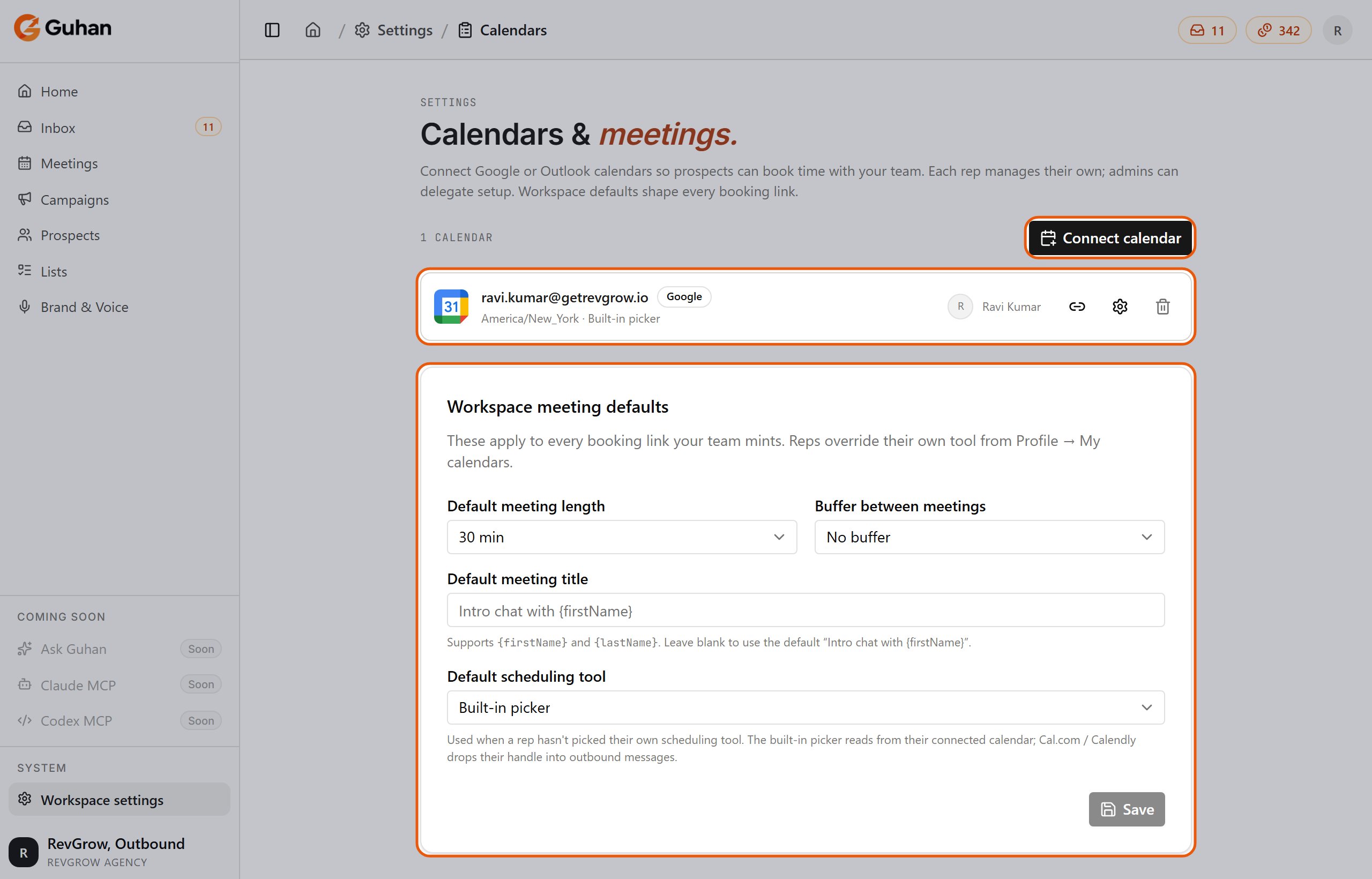
Workspace admins set defaults under Settings, Calendars, in the Workspace meeting defaults card:
Setting
Options
Default meeting length
15, 20, 30 (default), 45, 60, or 90 minutes
Buffer between meetings
No buffer (default), 5, 10, 15, or 30 minutes
Default meeting title
Supports {firstName} and {lastName}. Blank uses “Intro chat with ”.
Default scheduling tool
Built-in picker, Cal.com link, or Calendly link
Each rep can override their scheduling tool, and set their own working hours, timezone, and meeting room on their own calendar. The meeting length is fixed into a booking link when it is created, so changing the default later does not change links already sent.
Settings, Calendars: your connected calendars and the workspace meeting defaults
Each rep connects their own calendar. A booking link is created against the calendar of the person sending it, so the meeting appears on that person’s calendar. Round-robin across reps is not supported.
The person clicking needs their own active calendar. Connect it under Settings, Calendars, or from your profile under My calendars.
A booking is not showing on the Meetings page
For Cal.com and Calendly, bookings arrive through a connection you set up once in that tool. If it was never set up, or was set up incorrectly, bookings will not appear. Re-check the setup steps in Calendar integrations.
The prospect says no times are available
Open times come from your calendar’s working hours and busy events. Check the working hours and timezone on the calendar under Settings, Calendars.
A booking link was shared by mistake
There is no way to revoke an individual link from the app today. If a public link has been shared more widely than you intended, contact support.
{"docsConfig":{"theme":"mint","$schema":"https://mintlify.com/docs.json","name":"Guhan","description":"Guhan is an AI SDR — a Sales Development Representative that runs the full outbound workflow: learns your business, finds fit prospects, researches every one, drafts hyper-personalized outreach across LinkedIn, Email, and WhatsApp, handles replies, and books meetings for the sales team.","colors":{"primary":"#EA580C","light":"#FB923C","dark":"#C2410C"},"logo":{"light":"https://mintcdn.com/guhan/86NRPSItwy-XKHHH/logo/guhan-logo.webp?fit=max\u0026auto=format\u0026n=86NRPSItwy-XKHHH\u0026q=85\u0026s=32cb8c4b5a6074c22f2d95bf2043b07e","dark":"https://mintcdn.com/guhan/lKN7luO_SLqydmqp/logo/guhan_horizontal_transparent.png?fit=max\u0026auto=format\u0026n=lKN7luO_SLqydmqp\u0026q=85\u0026s=d54f80f22d421c0b7e6c2351e46b876b"},"favicon":"https://mintcdn.com/guhan/fvATTrWQ6CYVCCqT/favicon.ico?fit=max\u0026auto=format\u0026n=fvATTrWQ6CYVCCqT\u0026q=85\u0026s=090cf06a818931d3c4b7b5d896ef7b2a","navbar":{"links":[{"href":"mailto:hello@guhan.ai","label":"Support"}],"primary":{"type":"button","label":"Launch app","href":"https://guhan.ai"}},"footer":{"socials":{"linkedin":"https://linkedin.com/company/guhanai"}},"seo":{"metatags":{"canonical":"https://docs.guhan.ai","description":"Guhan is an AI SDR — the same role as a human Sales Development Representative embedded on your team, just executed in software. It learns your business, finds fit prospects, researches every one, drafts hyper-personalized outreach across LinkedIn, Email, and WhatsApp, handles replies, and books meetings.","keywords":"Guhan, AI SDR, AI Sales Development Representative, autonomous AI sales agent, AI sales agent, outbound sales, intent-based prospecting, buying signals, hyper-personalized outreach, LinkedIn automation, cold email AI, WhatsApp outreach, multi-channel sales, sales automation, sales prospecting tool, B2B lead generation, AI personalization, sales pipeline automation, signal-based sales lists, smart prospect lists","og:title":"Guhan Docs — AI SDR for LinkedIn, Email, WhatsApp","og:description":"Guhan is an AI SDR that learns your business, finds fit prospects, researches every one, drafts hyper-personalized outreach across LinkedIn, Email, and WhatsApp, and books meetings — so your pipeline grows without manual SDR work.","og:site_name":"Guhan AI","og:type":"website","og:url":"https://docs.guhan.ai","og:image":"https://guhan.ai/logos/guhan-logo.webp","twitter:card":"summary_large_image","twitter:title":"Guhan Docs — AI SDR for LinkedIn, Email, WhatsApp","twitter:description":"AI SDR that learns your business, finds fit prospects, researches every one, drafts hyper-personalized outreach across LinkedIn, Email, and WhatsApp, and books meetings.","twitter:image":"https://guhan.ai/logos/guhan-logo.webp","robots":"index, follow","author":"Guhan AI","theme-color":"#EA580C"},"indexing":"navigable"},"styling":{"latex":true},"navigation":{"global":{"anchors":[{"anchor":"Launch app","icon":"arrow-up-right-from-square","href":"https://guhan.ai"},{"anchor":"Contact","icon":"envelope","href":"mailto:hello@guhan.ai"}]},"pages":[]}},"deployment":{"deploymentMetadataValue":{"subdomain":"guhan","hasAudioNarration":false,"actualSubdomain":"guhan","customDomains":["docs.guhan.ai"],"gitSource":{"type":"github","owner":"guhanai","repo":"docs","deployBranch":"main","contentDirectory":"","isPrivate":false,"mountPath":"","label":""},"chroma":{"collectionId":"ab393200-2da7-4dfb-84b1-f0432e7c4566","liveDeploymentHistoryId":"6adf82d4f325da4ba4e1adc8","schemaVersion":"v3","latestBuiltDeploymentHistoryId":"6adf82d4f325da4ba4e1adc8"},"entitlements":{"AI_CHAT":{"status":"DISABLED"}},"buildId":"6adf82d4f325da4ba4e1adc8","clientVersion":"0.0.4044","searchFilterCounts":[{"language":"default","tag":"Documentation","count":39},{"language":"default","tag":"Get started","count":9},{"language":"default","tag":"Find prospects","count":8},{"language":"default","tag":"Chrome extension","count":6},{"language":"default","tag":"Run campaigns","count":5},{"language":"default","tag":"Help","count":5},{"language":"default","tag":"Replies and meetings","count":5},{"language":"default","tag":"Account","count":5},{"language":"default","tag":"Brand \u0026 Voice","count":4},{"language":"default","tag":"Sender accounts","count":4}]},"assistantConfig":{"enableAskAiButton":false,"enableStarterQuestions":false,"enableContextualStarterQuestions":false,"enableAskAiSearchBar":true},"basePath":"","hasChatPermissions":false,"hasWebMcpPermissions":false,"toggles":[{"name":"kill-isr","enabled":true,"variant":{"name":"disabled","enabled":false,"feature_enabled":true},"impressionData":false},{"name":"agent-mintlify-slack","enabled":true,"variant":{"name":"disabled","enabled":false,"feature_enabled":true},"impressionData":false},{"name":"agent-integrations-settings","enabled":true,"variant":{"name":"disabled","enabled":false,"feature_enabled":true},"impressionData":false},{"name":"automations-pr-grouping","enabled":true,"variant":{"name":"disabled","enabled":false,"feature_enabled":true},"impressionData":false},{"name":"custom-prefix","enabled":true,"variant":{"name":"disabled","enabled":false,"feature_enabled":true},"impressionData":false},{"name":"analytics-v7","enabled":true,"variant":{"name":"disabled","enabled":false,"feature_enabled":true},"impressionData":false},{"name":"user-flows-analytics","enabled":true,"variant":{"name":"disabled","enabled":false,"feature_enabled":true},"impressionData":false},{"name":"no-publish-flow","enabled":true,"variant":{"name":"disabled","enabled":false,"feature_enabled":true},"impressionData":false},{"name":"workos-onboarding","enabled":true,"variant":{"name":"disabled","enabled":false,"feature_enabled":true},"impressionData":false},{"name":"llms-txt-v2","enabled":true,"variant":{"name":"disabled","enabled":false,"feature_enabled":true},"impressionData":false},{"name":"snapshot-serving-live","enabled":true,"variant":{"name":"disabled","enabled":false,"feature_enabled":true},"impressionData":false},{"name":"stripTemperatureMiddleware","enabled":true,"variant":{"name":"disabled","enabled":false,"feature_enabled":true},"impressionData":false},{"name":"support-platform-pylon-zendesk","enabled":true,"variant":{"name":"disabled","enabled":false,"feature_enabled":true},"impressionData":false},{"name":"snapshot-serving","enabled":true,"variant":{"name":"disabled","enabled":false,"feature_enabled":true},"impressionData":false},{"name":"instant-rollback","enabled":true,"variant":{"name":"disabled","enabled":false,"feature_enabled":true},"impressionData":false},{"name":"granular-notifications-server","enabled":true,"variant":{"name":"disabled","enabled":false,"feature_enabled":true},"impressionData":false},{"name":"granular-notifications","enabled":true,"variant":{"name":"disabled","enabled":false,"feature_enabled":true},"impressionData":false},{"name":"automations-fable","enabled":true,"variant":{"name":"disabled","enabled":false,"feature_enabled":true},"impressionData":false},{"name":"fixed-ai-action-pricing","enabled":true,"variant":{"name":"disabled","enabled":false,"feature_enabled":true},"impressionData":false},{"name":"automation-resolve-merge-conflict","enabled":true,"variant":{"name":"disabled","enabled":false,"feature_enabled":true},"impressionData":false},{"name":"scoped-publishing","enabled":true,"variant":{"name":"disabled","enabled":false,"feature_enabled":true},"impressionData":false},{"name":"mintql","enabled":true,"variant":{"name":"disabled","enabled":false,"feature_enabled":true},"impressionData":false},{"name":"page-level-analytics","enabled":true,"variant":{"name":"disabled","enabled":false,"feature_enabled":true},"impressionData":false},{"name":"editor-version-history-v2","enabled":true,"variant":{"name":"disabled","enabled":false,"feature_enabled":true},"impressionData":false},{"name":"billing-page-v2","enabled":true,"variant":{"name":"disabled","enabled":false,"feature_enabled":true},"impressionData":false},{"name":"full-page-search","enabled":true,"variant":{"name":"disabled","enabled":false,"feature_enabled":true},"impressionData":false},{"name":"workspace-projects","enabled":true,"variant":{"name":"disabled","enabled":false,"feature_enabled":true},"impressionData":false},{"name":"assistant-v5","enabled":true,"variant":{"name":"disabled","enabled":false,"feature_enabled":true},"impressionData":false},{"name":"byok-sep-25","enabled":true,"variant":{"name":"disabled","enabled":false,"feature_enabled":true},"impressionData":false},{"name":"fork-pr-previews","enabled":true,"variant":{"name":"disabled","enabled":false,"feature_enabled":true},"impressionData":false},{"name":"revalidation-jwt","enabled":true,"variant":{"name":"disabled","enabled":false,"feature_enabled":true},"impressionData":false},{"name":"vite-origin","enabled":true,"variant":{"name":"disabled","enabled":false,"feature_enabled":true},"impressionData":false},{"name":"billing-updated-9-15","enabled":true,"variant":{"name":"disabled","enabled":false,"feature_enabled":true},"impressionData":false},{"name":"workos-sso-scim","enabled":true,"variant":{"name":"disabled","enabled":false,"feature_enabled":true},"impressionData":false},{"name":"hobby-abuse-scan","enabled":true,"variant":{"name":"disabled","enabled":false,"feature_enabled":true},"impressionData":false},{"name":"dashboard-inbox","enabled":true,"variant":{"name":"disabled","enabled":false,"feature_enabled":true},"impressionData":false},{"name":"workos-signup","enabled":true,"variant":{"name":"disabled","enabled":false,"feature_enabled":true},"impressionData":false},{"name":"turbopuffer-dual-write","enabled":true,"variant":{"name":"disabled","enabled":false,"feature_enabled":true},"impressionData":false},{"name":"workos-enabled","enabled":true,"variant":{"name":"disabled","enabled":false,"feature_enabled":true},"impressionData":false},{"name":"approve-review-flow","enabled":true,"variant":{"name":"disabled","enabled":false,"feature_enabled":true},"impressionData":false},{"name":"sso-setup-deadline-banner","enabled":true,"variant":{"name":"disabled","enabled":false,"feature_enabled":true},"impressionData":false}],"googleFontsInlined":false},"customCss":[],"page":{"pagePath":"meetings/overview","slug":"/meetings/overview","pageMetadata":{"title":"Meetings","description":"Turn a meeting request into a booked call. Send a booking link, the prospect picks a time, and it appears on your calendar.","href":"/meetings/overview"},"description":{"compiledSource":"\"use strict\";\nconst {jsx: _jsx} = arguments[0];\nconst {useMDXComponents: _provideComponents} = arguments[0];\nfunction _createMdxContent(props) {\n const _components = {\n p: \"p\",\n ..._provideComponents(),\n ...props.components\n };\n return _jsx(_components.p, {\n children: \"Turn a meeting request into a booked call. Send a booking link, the prospect picks a time, and it appears on your calendar.\"\n });\n}\nfunction MDXContent(props = {}) {\n const {wrapper: MDXLayout} = {\n ..._provideComponents(),\n ...props.components\n };\n return MDXLayout ? _jsx(MDXLayout, {\n ...props,\n children: _jsx(_createMdxContent, {\n ...props\n })\n }) : _createMdxContent(props);\n}\nreturn {\n default: MDXContent\n};\n","frontmatter":{},"scope":{}},"pageType":"default","mdx":{"mdxSource":{"compiledSource":"\"use strict\";const{Fragment:_Fragment,jsx:_jsx,jsxs:_jsxs}=arguments[0];const{useMDXComponents:_provideComponents}=arguments[0];function _createMdxContent(props){const _components={a:`a`,code:`code`,p:`p`,strong:`strong`,tbody:`tbody`,td:`td`,th:`th`,thead:`thead`,tr:`tr`,..._provideComponents(),...props.components},{Accordion,AccordionGroup,Card,CardGroup,Frame,Heading,Note,OptimizedImage,Step,Steps,Table}=_components;if(!Accordion)_missingMdxReference(`Accordion`,true);if(!AccordionGroup)_missingMdxReference(`AccordionGroup`,true);if(!Card)_missingMdxReference(`Card`,true);if(!CardGroup)_missingMdxReference(`CardGroup`,true);if(!Frame)_missingMdxReference(`Frame`,true);if(!Heading)_missingMdxReference(`Heading`,true);if(!Note)_missingMdxReference(`Note`,true);if(!OptimizedImage)_missingMdxReference(`OptimizedImage`,true);if(!Step)_missingMdxReference(`Step`,true);if(!Steps)_missingMdxReference(`Steps`,true);if(!Table)_missingMdxReference(`Table`,true);return _jsxs(_Fragment,{children:[_jsx(_components.p,{children:_jsx(_components.strong,{children:`When a prospect asks to meet, you send a booking link from the Inbox. They pick a time, the event appears on your calendar, and the meeting appears on the Meetings page.`})}),`\n`,_jsx(_components.p,{children:`A meeting request is the one reply Guhan never answers on its own. It always comes to a person, so you decide when to put your calendar in front of a prospect.`}),`\n`,_jsx(Heading,{level:`2`,id:`before-you-start`,children:`Before you start`}),`\n`,_jsxs(_components.p,{children:[`You need a connected calendar. Set one up under Settings, Calendars. See `,_jsx(_components.a,{href:`/meetings/calendar-integrations`,children:`Calendar integrations`}),` for Google, Outlook, Cal.com, and Calendly.`]}),`\n`,_jsx(Heading,{level:`2`,id:`book-a-meeting`,children:`Book a meeting`}),`\n`,_jsxs(Steps,{children:[_jsxs(Step,{title:`A meeting request arrives`,children:[_jsxs(_components.p,{children:[`The conversation appears in your Inbox under “Needs you” with a `,_jsx(_components.strong,{children:`Schedule`}),` tag. Guhan marks these as high priority.`]}),_jsx(Frame,{caption:`An open meeting request: the Schedule waiting chip, and Send link at the bottom`,children:_jsx(OptimizedImage,{src:`https://mintcdn.com/guhan/1rf2hM4rx6TDJeKC/images/ib-schedule.png?fit=max\u0026auto=format\u0026n=1rf2hM4rx6TDJeKC\u0026q=85\u0026s=a5782f65bd17aace970d19461a2de0df`,alt:`An open meeting request: the Schedule waiting chip, and Send link at the bottom`,width:`1500`,height:`860`,\"data-og-width\":`3000`,\"data-og-height\":`1720`,\"data-path\":`images/ib-schedule.png`,\"data-optimize\":`true`,\"data-opv\":`3`,srcset:`https://mintcdn.com/guhan/1rf2hM4rx6TDJeKC/images/ib-schedule.png?w=280\u0026fit=max\u0026auto=format\u0026n=1rf2hM4rx6TDJeKC\u0026q=85\u0026s=1578ff86ff2783015442e7cd91ca0e00 280w, https://mintcdn.com/guhan/1rf2hM4rx6TDJeKC/images/ib-schedule.png?w=560\u0026fit=max\u0026auto=format\u0026n=1rf2hM4rx6TDJeKC\u0026q=85\u0026s=ea1abcc658553b3376248905bd2f84e7 560w, https://mintcdn.com/guhan/1rf2hM4rx6TDJeKC/images/ib-schedule.png?w=840\u0026fit=max\u0026auto=format\u0026n=1rf2hM4rx6TDJeKC\u0026q=85\u0026s=77055a47d31df1d46359a36a8d421ba5 840w, https://mintcdn.com/guhan/1rf2hM4rx6TDJeKC/images/ib-schedule.png?w=1100\u0026fit=max\u0026auto=format\u0026n=1rf2hM4rx6TDJeKC\u0026q=85\u0026s=bab11c755ba5842a7879d54981107d2c 1100w, https://mintcdn.com/guhan/1rf2hM4rx6TDJeKC/images/ib-schedule.png?w=1650\u0026fit=max\u0026auto=format\u0026n=1rf2hM4rx6TDJeKC\u0026q=85\u0026s=6251c74e1a41afde865b8932fd31ebd9 1650w, https://mintcdn.com/guhan/1rf2hM4rx6TDJeKC/images/ib-schedule.png?w=2500\u0026fit=max\u0026auto=format\u0026n=1rf2hM4rx6TDJeKC\u0026q=85\u0026s=0550be6f5fe16d59efbf48c2487d29fa 2500w`})})]}),_jsx(Step,{title:`Click Send link`,children:_jsx(_components.p,{children:`At the bottom of the thread. Guhan creates a booking link for you and sends it to the prospect in the same conversation.`})}),_jsx(Step,{title:`The prospect books`,children:_jsx(_components.p,{children:`With Google or Outlook, they open a Guhan-hosted booking page showing your open times, pick one, and confirm. With Cal.com or Calendly, they go to your own booking page.`})}),_jsx(Step,{title:`The meeting shows up`,children:_jsx(_components.p,{children:`The event is on your calendar and listed under Meetings, linked to the prospect and the conversation it came from.`})})]}),`\n`,_jsx(_components.p,{children:`You can also share your public booking link yourself, for example in a manual reply. Copy it from the calendar’s row in Settings, Calendars. Bookings from it are matched to a prospect by email where possible.`}),`\n`,_jsx(Heading,{level:`2`,id:`the-meetings-page`,children:`The Meetings page`}),`\n`,_jsx(_components.p,{children:`Sidebar, Meetings. Tabs:`}),`\n`,_jsxs(Table,{children:[_jsx(_components.thead,{children:_jsxs(_components.tr,{children:[_jsx(_components.th,{children:`Tab`}),_jsx(_components.th,{children:`Shows`})]})}),_jsxs(_components.tbody,{children:[_jsxs(_components.tr,{children:[_jsx(_components.td,{children:_jsx(_components.strong,{children:`Upcoming`})}),_jsx(_components.td,{children:`Booked and still ahead, grouped by Today, Tomorrow, This week, Next week, Later.`})]}),_jsxs(_components.tr,{children:[_jsx(_components.td,{children:_jsx(_components.strong,{children:`Past`})}),_jsx(_components.td,{children:`Meetings that have already happened.`})]}),_jsxs(_components.tr,{children:[_jsx(_components.td,{children:_jsx(_components.strong,{children:`Cancelled`})}),_jsx(_components.td,{children:`Meetings cancelled by either side.`})]}),_jsxs(_components.tr,{children:[_jsx(_components.td,{children:_jsx(_components.strong,{children:`Unmatched`})}),_jsx(_components.td,{children:`Meetings on your calendar that Guhan could not tie to a prospect, such as bookings made outside Guhan.`})]}),_jsxs(_components.tr,{children:[_jsx(_components.td,{children:_jsx(_components.strong,{children:`All`})}),_jsx(_components.td,{children:`Everything.`})]})]})]}),`\n`,_jsx(_components.p,{children:`Each meeting carries a badge for where it was booked: Picker (Guhan’s booking page), Cal.com, Calendly, or Calendar (picked up from your calendar).`}),`\n`,_jsxs(_components.p,{children:[`Click a meeting to see the prospect, the time, the join link, and the conversation behind it. To cancel, use `,_jsx(_components.strong,{children:`Cancel meeting`}),`. The event is removed from the calendar and the prospect is notified by their calendar provider.`]}),`\n`,_jsx(Note,{children:_jsx(_components.p,{children:`To reschedule, the prospect uses the reschedule link in their calendar invite. There is no reschedule button inside Guhan.`})}),`\n`,_jsx(Frame,{caption:`Meetings: the Upcoming, Past, Cancelled, Unmatched and All tabs, with each meeting grouped by day and tagged with how it was booked`,children:_jsx(OptimizedImage,{src:`https://mintcdn.com/guhan/1rf2hM4rx6TDJeKC/images/mt-list.png?fit=max\u0026auto=format\u0026n=1rf2hM4rx6TDJeKC\u0026q=85\u0026s=ed5ae500d3b8e9d0108a93eeaec8278c`,alt:`Meetings: the Upcoming, Past, Cancelled, Unmatched and All tabs, with each meeting grouped by day and tagged with how it was booked`,width:`1280`,height:`640`,\"data-og-width\":`2560`,\"data-og-height\":`1280`,\"data-path\":`images/mt-list.png`,\"data-optimize\":`true`,\"data-opv\":`3`,srcset:`https://mintcdn.com/guhan/1rf2hM4rx6TDJeKC/images/mt-list.png?w=280\u0026fit=max\u0026auto=format\u0026n=1rf2hM4rx6TDJeKC\u0026q=85\u0026s=06cffa8e58d43335ffc27582734107f2 280w, https://mintcdn.com/guhan/1rf2hM4rx6TDJeKC/images/mt-list.png?w=560\u0026fit=max\u0026auto=format\u0026n=1rf2hM4rx6TDJeKC\u0026q=85\u0026s=8c61b9a93aa093f993f1008a95f351b8 560w, https://mintcdn.com/guhan/1rf2hM4rx6TDJeKC/images/mt-list.png?w=840\u0026fit=max\u0026auto=format\u0026n=1rf2hM4rx6TDJeKC\u0026q=85\u0026s=7bcaad4b6b1bc5d1b42f3517b6ad467b 840w, https://mintcdn.com/guhan/1rf2hM4rx6TDJeKC/images/mt-list.png?w=1100\u0026fit=max\u0026auto=format\u0026n=1rf2hM4rx6TDJeKC\u0026q=85\u0026s=68baf2f6fc2ca548374c40976ba5ce79 1100w, https://mintcdn.com/guhan/1rf2hM4rx6TDJeKC/images/mt-list.png?w=1650\u0026fit=max\u0026auto=format\u0026n=1rf2hM4rx6TDJeKC\u0026q=85\u0026s=c61412257ef43f86dbb6425a6cfb1f2b 1650w, https://mintcdn.com/guhan/1rf2hM4rx6TDJeKC/images/mt-list.png?w=2500\u0026fit=max\u0026auto=format\u0026n=1rf2hM4rx6TDJeKC\u0026q=85\u0026s=86b97478914d3c005ca2aa101883e9fa 2500w`})}),`\n`,_jsx(Frame,{caption:`Click a meeting to see its time, join link, prospect, host and attendees. Cancel meeting is at the bottom`,children:_jsx(OptimizedImage,{src:`https://mintcdn.com/guhan/1rf2hM4rx6TDJeKC/images/mt-sheet.png?fit=max\u0026auto=format\u0026n=1rf2hM4rx6TDJeKC\u0026q=85\u0026s=ea2db298d42cd776067119c3c4770b26`,alt:`Click a meeting to see its time, join link, prospect, host and attendees. Cancel meeting is at the bottom`,width:`1280`,height:`640`,\"data-og-width\":`2560`,\"data-og-height\":`1280`,\"data-path\":`images/mt-sheet.png`,\"data-optimize\":`true`,\"data-opv\":`3`,srcset:`https://mintcdn.com/guhan/1rf2hM4rx6TDJeKC/images/mt-sheet.png?w=280\u0026fit=max\u0026auto=format\u0026n=1rf2hM4rx6TDJeKC\u0026q=85\u0026s=a426c0d8df7a7d2f575cdf39ab20ca68 280w, https://mintcdn.com/guhan/1rf2hM4rx6TDJeKC/images/mt-sheet.png?w=560\u0026fit=max\u0026auto=format\u0026n=1rf2hM4rx6TDJeKC\u0026q=85\u0026s=1a55108ee3bdc85b6ef66352f452a5ed 560w, https://mintcdn.com/guhan/1rf2hM4rx6TDJeKC/images/mt-sheet.png?w=840\u0026fit=max\u0026auto=format\u0026n=1rf2hM4rx6TDJeKC\u0026q=85\u0026s=eadb1e48a9e43722b86beba6a03c442a 840w, https://mintcdn.com/guhan/1rf2hM4rx6TDJeKC/images/mt-sheet.png?w=1100\u0026fit=max\u0026auto=format\u0026n=1rf2hM4rx6TDJeKC\u0026q=85\u0026s=72a5e68021c24b473c5033027123dc12 1100w, https://mintcdn.com/guhan/1rf2hM4rx6TDJeKC/images/mt-sheet.png?w=1650\u0026fit=max\u0026auto=format\u0026n=1rf2hM4rx6TDJeKC\u0026q=85\u0026s=dc76a073847b4a3c3dd19a24b8c4a389 1650w, https://mintcdn.com/guhan/1rf2hM4rx6TDJeKC/images/mt-sheet.png?w=2500\u0026fit=max\u0026auto=format\u0026n=1rf2hM4rx6TDJeKC\u0026q=85\u0026s=b96ef3c2ed4c89b248dbdea111f322d7 2500w`})}),`\n`,_jsx(Heading,{level:`2`,id:`meeting-defaults`,children:`Meeting defaults`}),`\n`,_jsxs(_components.p,{children:[`Workspace admins set defaults under Settings, Calendars, in the `,_jsx(_components.strong,{children:`Workspace meeting defaults`}),` card:`]}),`\n`,_jsxs(Table,{children:[_jsx(_components.thead,{children:_jsxs(_components.tr,{children:[_jsx(_components.th,{children:`Setting`}),_jsx(_components.th,{children:`Options`})]})}),_jsxs(_components.tbody,{children:[_jsxs(_components.tr,{children:[_jsx(_components.td,{children:_jsx(_components.strong,{children:`Default meeting length`})}),_jsx(_components.td,{children:`15, 20, 30 (default), 45, 60, or 90 minutes`})]}),_jsxs(_components.tr,{children:[_jsx(_components.td,{children:_jsx(_components.strong,{children:`Buffer between meetings`})}),_jsx(_components.td,{children:`No buffer (default), 5, 10, 15, or 30 minutes`})]}),_jsxs(_components.tr,{children:[_jsx(_components.td,{children:_jsx(_components.strong,{children:`Default meeting title`})}),_jsxs(_components.td,{children:[`Supports `,_jsx(_components.code,{children:`{firstName}`}),` and `,_jsx(_components.code,{children:`{lastName}`}),`. Blank uses “Intro chat with `,`”.`]})]}),_jsxs(_components.tr,{children:[_jsx(_components.td,{children:_jsx(_components.strong,{children:`Default scheduling tool`})}),_jsx(_components.td,{children:`Built-in picker, Cal.com link, or Calendly link`})]})]})]}),`\n`,_jsx(_components.p,{children:`Each rep can override their scheduling tool, and set their own working hours, timezone, and meeting room on their own calendar. The meeting length is fixed into a booking link when it is created, so changing the default later does not change links already sent.`}),`\n`,_jsx(Frame,{caption:`Settings, Calendars: your connected calendars and the workspace meeting defaults`,children:_jsx(OptimizedImage,{src:`https://mintcdn.com/guhan/Bzm2bcLJY46uJV9C/images/se-calendars.png?fit=max\u0026auto=format\u0026n=Bzm2bcLJY46uJV9C\u0026q=85\u0026s=f3d95dc65fd246fc5b4f96feb60d1c17`,alt:`Settings, Calendars: your connected calendars and the workspace meeting defaults`,width:`1280`,height:`820`,\"data-og-width\":`2560`,\"data-og-height\":`1640`,\"data-path\":`images/se-calendars.png`,\"data-optimize\":`true`,\"data-opv\":`3`,srcset:`https://mintcdn.com/guhan/Bzm2bcLJY46uJV9C/images/se-calendars.png?w=280\u0026fit=max\u0026auto=format\u0026n=Bzm2bcLJY46uJV9C\u0026q=85\u0026s=874159b2d9043f9047b2569031ef0e63 280w, https://mintcdn.com/guhan/Bzm2bcLJY46uJV9C/images/se-calendars.png?w=560\u0026fit=max\u0026auto=format\u0026n=Bzm2bcLJY46uJV9C\u0026q=85\u0026s=dedad46ec006dec8ac9d32199e9c037f 560w, https://mintcdn.com/guhan/Bzm2bcLJY46uJV9C/images/se-calendars.png?w=840\u0026fit=max\u0026auto=format\u0026n=Bzm2bcLJY46uJV9C\u0026q=85\u0026s=652dc347a0e5ddb202227f4fa89ffbe9 840w, https://mintcdn.com/guhan/Bzm2bcLJY46uJV9C/images/se-calendars.png?w=1100\u0026fit=max\u0026auto=format\u0026n=Bzm2bcLJY46uJV9C\u0026q=85\u0026s=0c31ee436342323536a4986c3ce3c726 1100w, https://mintcdn.com/guhan/Bzm2bcLJY46uJV9C/images/se-calendars.png?w=1650\u0026fit=max\u0026auto=format\u0026n=Bzm2bcLJY46uJV9C\u0026q=85\u0026s=8491d57972f6ec9ce22b7315dd5eecad 1650w, https://mintcdn.com/guhan/Bzm2bcLJY46uJV9C/images/se-calendars.png?w=2500\u0026fit=max\u0026auto=format\u0026n=Bzm2bcLJY46uJV9C\u0026q=85\u0026s=fd4342de20773996790764e6a2e55d0b 2500w`})}),`\n`,_jsx(Heading,{level:`2`,id:`teams`,children:`Teams`}),`\n`,_jsx(_components.p,{children:`Each rep connects their own calendar. A booking link is created against the calendar of the person sending it, so the meeting appears on that person’s calendar. Round-robin across reps is not supported.`}),`\n`,_jsx(Heading,{level:`2`,id:`if-something’s-off`,children:`If something’s off`}),`\n`,_jsxs(AccordionGroup,{children:[_jsx(Accordion,{title:`Send link says no calendar is connected`,id:`send-link-says-no-calendar-is-connected`,children:_jsx(_components.p,{children:`The person clicking needs their own active calendar. Connect it under Settings, Calendars, or from your profile under My calendars.`})}),_jsx(Accordion,{title:`A booking is not showing on the Meetings page`,id:`a-booking-is-not-showing-on-the-meetings-page`,children:_jsxs(_components.p,{children:[`For Cal.com and Calendly, bookings arrive through a connection you set up once in that tool. If it was never set up, or was set up incorrectly, bookings will not appear. Re-check the setup steps in `,_jsx(_components.a,{href:`/meetings/calendar-integrations`,children:`Calendar integrations`}),`.`]})}),_jsx(Accordion,{title:`The prospect says no times are available`,id:`the-prospect-says-no-times-are-available`,children:_jsx(_components.p,{children:`Open times come from your calendar’s working hours and busy events. Check the working hours and timezone on the calendar under Settings, Calendars.`})}),_jsx(Accordion,{title:`A booking link was shared by mistake`,id:`a-booking-link-was-shared-by-mistake`,children:_jsx(_components.p,{children:`There is no way to revoke an individual link from the app today. If a public link has been shared more widely than you intended, contact support.`})})]}),`\n`,_jsx(Heading,{level:`2`,id:`related`,children:`Related`}),`\n`,_jsxs(CardGroup,{cols:3,children:[_jsx(Card,{title:`Calendar integrations`,icon:`calendar`,href:`/meetings/calendar-integrations`,children:_jsx(_components.p,{children:`Connect Google, Outlook, Cal.com, or Calendly.`})}),_jsx(Card,{title:`Handle replies`,icon:`reply`,href:`/inbox/handle-replies`,children:_jsx(_components.p,{children:`Where meeting requests arrive.`})}),_jsx(Card,{title:`AI reply drafts`,icon:`wand-magic`,href:`/inbox/ai-reply-drafts`,children:_jsx(_components.p,{children:`Why meeting requests always reach a person.`})})]})]})}function MDXContent(props={}){const{wrapper:MDXLayout}={..._provideComponents(),...props.components};return MDXLayout?_jsx(MDXLayout,{...props,children:_jsx(_createMdxContent,{...props})}):_createMdxContent(props)}return{default:MDXContent};function _missingMdxReference(id,component){throw new Error(`Expected `+(component?`component`:`object`)+\" `\"+id+\"` to be defined: you likely forgot to import, pass, or provide it.\")}","frontmatter":{},"scope":{"config":{},"pageMetadata":{"title":"Meetings","description":"Turn a meeting request into a booked call. Send a booking link, the prospect picks a time, and it appears on your calendar.","href":"/meetings/overview"}}},"mdxSourceWithNoJs":null},"mdxExtracts":{"tableOfContents":[{"title":"Before you start","slug":"before-you-start","depth":2,"children":[]},{"title":"Book a meeting","slug":"book-a-meeting","depth":2,"children":[]},{"title":"The Meetings page","slug":"the-meetings-page","depth":2,"children":[]},{"title":"Meeting defaults","slug":"meeting-defaults","depth":2,"children":[]},{"title":"Teams","slug":"teams","depth":2,"children":[]},{"title":"If something’s off","slug":"if-something’s-off","depth":2,"children":[]},{"title":"Related","slug":"related","depth":2,"children":[]}],"codeExamples":{}},"jsLinks":[],"subdomain":"guhan","siteName":"Guhan","title":"Guhan Docs — AI SDR for LinkedIn, Email, WhatsApp","navMaps":{"firstHrefInVersion":{},"firstHrefInLanguage":{}},"lastModified":"2026-10-10T06:13:52.340Z","originalFileLocation":"meetings/overview.mdx"},"headHtml":"\u003cscript data-mint-head>(function(){var d=document.documentElement,p=null;if(!p){try{p=localStorage.getItem(\"isDarkMode\")}catch(e){}if(p==='true')p='dark';else if(p==='false')p='light';if(p!=='light'\u0026\u0026p!=='dark'\u0026\u0026p!=='system')p=\"system\"}var r=p==='system'?(matchMedia(\"(prefers-color-scheme: dark)\").matches?'dark':'light'):p;d.classList.remove(r==='dark'?'light':'dark');d.classList.add(r);d.setAttribute(\"data-theme-preference\",p)})();\u003c/script>\u003cmeta data-mint-head name=\"description\" content=\"Turn a meeting request into a booked call. Send a booking link, the prospect picks a time, and it appears on your calendar.\">\u003cmeta data-mint-head name=\"keywords\" content=\"Guhan, AI SDR, AI Sales Development Representative, autonomous AI sales agent, AI sales agent, outbound sales, intent-based prospecting, buying signals, hyper-personalized outreach, LinkedIn automation, cold email AI, WhatsApp outreach, multi-channel sales, sales automation, sales prospecting tool, B2B lead generation, AI personalization, sales pipeline automation, signal-based sales lists, smart prospect lists\">\u003cmeta data-mint-head name=\"application-name\" content=\"Guhan\">\u003cmeta data-mint-head name=\"generator\" content=\"Mintlify\">\u003cmeta data-mint-head name=\"robots\" content=\"index, follow\">\u003clink data-mint-head rel=\"icon\" type=\"image/png\" sizes=\"192x192\" href=\"/mintlify-assets/_mintlify/favicons/guhan/T3r-iZ6f5LtCKmue/_generated/favicon/android-chrome-192x192.png\" media=\"(prefers-color-scheme: light)\">\u003clink data-mint-head rel=\"apple-touch-icon\" type=\"image/png\" sizes=\"180x180\" href=\"/mintlify-assets/_mintlify/favicons/guhan/T3r-iZ6f5LtCKmue/_generated/favicon/apple-touch-icon.png\">\u003clink data-mint-head rel=\"icon\" type=\"image/png\" sizes=\"16x16\" href=\"/mintlify-assets/_mintlify/favicons/guhan/T3r-iZ6f5LtCKmue/_generated/favicon/favicon-16x16.png\" media=\"(prefers-color-scheme: light)\">\u003clink data-mint-head rel=\"icon\" type=\"image/png\" sizes=\"32x32\" href=\"/mintlify-assets/_mintlify/favicons/guhan/T3r-iZ6f5LtCKmue/_generated/favicon/favicon-32x32.png\" media=\"(prefers-color-scheme: light)\">\u003clink data-mint-head rel=\"shortcut icon\" type=\"image/x-icon\" href=\"/mintlify-assets/_mintlify/favicons/guhan/T3r-iZ6f5LtCKmue/_generated/favicon/favicon.ico\" media=\"(prefers-color-scheme: light)\">\u003clink data-mint-head rel=\"icon\" type=\"image/png\" sizes=\"192x192\" href=\"/mintlify-assets/_mintlify/favicons/guhan/T3r-iZ6f5LtCKmue/_generated/favicon-dark/android-chrome-192x192.png\" media=\"(prefers-color-scheme: dark)\">\u003clink data-mint-head rel=\"icon\" type=\"image/png\" sizes=\"16x16\" href=\"/mintlify-assets/_mintlify/favicons/guhan/T3r-iZ6f5LtCKmue/_generated/favicon-dark/favicon-16x16.png\" media=\"(prefers-color-scheme: dark)\">\u003clink data-mint-head rel=\"icon\" type=\"image/png\" sizes=\"32x32\" href=\"/mintlify-assets/_mintlify/favicons/guhan/T3r-iZ6f5LtCKmue/_generated/favicon-dark/favicon-32x32.png\" media=\"(prefers-color-scheme: dark)\">\u003clink data-mint-head rel=\"shortcut icon\" type=\"image/x-icon\" href=\"/mintlify-assets/_mintlify/favicons/guhan/T3r-iZ6f5LtCKmue/_generated/favicon-dark/favicon.ico\" media=\"(prefers-color-scheme: dark)\">\u003cmeta data-mint-head property=\"og:title\" content=\"Guhan Docs — AI SDR for LinkedIn, Email, WhatsApp\">\u003cmeta data-mint-head property=\"og:description\" content=\"Guhan is an AI SDR that learns your business, finds fit prospects, researches every one, drafts hyper-personalized outreach across LinkedIn, Email, and WhatsApp, and books meetings — so your pipeline grows without manual SDR work.\">\u003cmeta data-mint-head property=\"og:site_name\" content=\"Guhan AI\">\u003cmeta data-mint-head property=\"og:url\" content=\"https://docs.guhan.ai/meetings/overview\">\u003cmeta data-mint-head property=\"og:type\" content=\"website\">\u003cmeta data-mint-head property=\"og:image\" content=\"https://guhan.ai/logos/guhan-logo.webp\">\u003cmeta data-mint-head property=\"og:image:width\" content=\"1200\">\u003cmeta data-mint-head property=\"og:image:height\" content=\"630\">\u003cmeta data-mint-head name=\"twitter:card\" content=\"summary_large_image\">\u003cmeta data-mint-head name=\"twitter:title\" content=\"Guhan Docs — AI SDR for LinkedIn, Email, WhatsApp\">\u003cmeta data-mint-head name=\"twitter:description\" content=\"AI SDR that learns your business, finds fit prospects, researches every one, drafts hyper-personalized outreach across LinkedIn, Email, and WhatsApp, and books meetings.\">\u003cmeta data-mint-head name=\"twitter:image\" content=\"https://guhan.ai/logos/guhan-logo.webp\">\u003cmeta data-mint-head name=\"twitter:image:width\" content=\"1200\">\u003cmeta data-mint-head name=\"twitter:image:height\" content=\"630\">\u003cmeta data-mint-head name=\"msapplication-config\" content=\"/mintlify-assets/_mintlify/favicons/guhan/T3r-iZ6f5LtCKmue/_generated/favicon/browserconfig.xml\">\u003cmeta data-mint-head name=\"apple-mobile-web-app-title\" content=\"Guhan\">\u003cmeta data-mint-head name=\"msapplication-TileColor\" content=\"#EA580C\">\u003cmeta data-mint-head name=\"author\" content=\"Guhan AI\">\u003cmeta data-mint-head name=\"theme-color\" content=\"#EA580C\">\u003clink data-mint-head rel=\"canonical\" href=\"https://docs.guhan.ai/meetings/overview\">\u003clink data-mint-head rel=\"alternate\" type=\"application/xml\" href=\"/sitemap.xml\">\u003clink data-mint-head rel=\"alternate\" type=\"text/markdown\" href=\"/meetings/overview.md\">\u003cscript data-mint-head type=\"application/ld+json\">{\"@context\":\"https://schema.org\",\"@graph\":[{\"@type\":\"Organization\",\"@id\":\"https://docs.guhan.ai/#organization\",\"name\":\"Guhan\",\"url\":\"https://docs.guhan.ai\",\"logo\":{\"@type\":\"ImageObject\",\"url\":\"https://mintcdn.com/guhan/86NRPSItwy-XKHHH/logo/guhan-logo.webp?fit=max\u0026auto=format\u0026n=86NRPSItwy-XKHHH\u0026q=85\u0026s=32cb8c4b5a6074c22f2d95bf2043b07e\"}},{\"@type\":\"WebSite\",\"@id\":\"https://docs.guhan.ai#website\",\"name\":\"Guhan\",\"url\":\"https://docs.guhan.ai\",\"publisher\":{\"@id\":\"https://docs.guhan.ai/#organization\"}},{\"@type\":\"WebPage\",\"@id\":\"https://docs.guhan.ai/meetings/overview#webpage\",\"url\":\"https://docs.guhan.ai/meetings/overview\",\"name\":\"Meetings\",\"description\":\"Turn a meeting request into a booked call. Send a booking link, the prospect picks a time, and it appears on your calendar.\",\"dateModified\":\"2026-10-10T06:13:52.340Z\",\"isPartOf\":{\"@id\":\"https://docs.guhan.ai#website\"},\"breadcrumb\":{\"@id\":\"https://docs.guhan.ai/meetings/overview#breadcrumb\"}},{\"@type\":\"BreadcrumbList\",\"@id\":\"https://docs.guhan.ai/meetings/overview#breadcrumb\",\"itemListElement\":[{\"@type\":\"ListItem\",\"position\":1,\"name\":\"Replies and meetings\",\"item\":\"https://docs.guhan.ai/inbox/overview\"},{\"@type\":\"ListItem\",\"position\":2,\"name\":\"Meetings\",\"item\":\"https://docs.guhan.ai/meetings/overview\"}]},{\"@type\":[\"Article\",\"TechArticle\"],\"@id\":\"https://docs.guhan.ai/meetings/overview#article\",\"headline\":\"Meetings\",\"name\":\"Meetings\",\"description\":\"Turn a meeting request into a booked call. Send a booking link, the prospect picks a time, and it appears on your calendar.\",\"url\":\"https://docs.guhan.ai/meetings/overview\",\"mainEntityOfPage\":{\"@id\":\"https://docs.guhan.ai/meetings/overview#webpage\"},\"image\":\"https://guhan.ai/logos/guhan-logo.webp\",\"dateModified\":\"2026-10-10T06:13:52.340Z\",\"publisher\":{\"@id\":\"https://docs.guhan.ai/#organization\"},\"isPartOf\":{\"@id\":\"https://docs.guhan.ai#website\"}}]}\u003c/script>\u003cscript data-mint-head type=\"application/ld+json\">{\"@context\":\"https://schema.org\",\"@type\":\"WebSite\",\"name\":\"Guhan\",\"creator\":{\"@type\":\"Organization\",\"name\":\"Mintlify\",\"url\":\"https://mintlify.com\"}}\u003c/script>","siteName":"Guhan","nav":{"global":{"anchors":[{"anchor":"Launch app","icon":"arrow-up-right-from-square","href":"https://guhan.ai"},{"anchor":"Contact","icon":"envelope","href":"mailto:hello@guhan.ai"}]},"tabs":[{"tab":"Documentation","groups":[{"group":"Get started","pages":[{"title":"Meet Guhan, your AI SDR","href":"/introduction"},{"title":"How Guhan works","href":"/get-started/how-guhan-works"},{"title":"Quickstart","href":"/quickstart"},{"group":"Sender accounts","pages":[{"title":"Sender accounts","href":"/get-started/sender-accounts/overview"},{"title":"Connect LinkedIn","href":"/get-started/sender-accounts/connect-linkedin"},{"title":"Connect email","href":"/get-started/sender-accounts/connect-email"},{"title":"Connect WhatsApp","href":"/get-started/sender-accounts/connect-whatsapp"}]}]},{"group":"Brand \u0026 Voice","pages":[{"title":"Brand \u0026 Voice","href":"/brand-and-voice/overview"},{"title":"Set up Brand \u0026 Voice","href":"/brand-and-voice/setup"},{"title":"Message templates","href":"/brand-and-voice/templates"},{"title":"Products and services","href":"/brand-and-voice/products"}]},{"group":"Find prospects","pages":[{"title":"Prospects","href":"/audience/prospects"},{"title":"Import leads","href":"/audience/import-leads"},{"title":"Lists","href":"/audience/lists"},{"title":"Signal catalog","href":"/audience/lists/signal-catalog"},{"title":"How prospects get added","href":"/audience/lists/how-prospects-get-added"},{"title":"Reviewing prospects","href":"/audience/lists/review-prospects"},{"title":"Companies","href":"/audience/companies"},{"title":"Enrichment","href":"/audience/enrichment"}]},{"group":"Run campaigns","pages":[{"title":"Campaigns","href":"/campaigns/overview"},{"title":"Build a campaign","href":"/campaigns/build-a-campaign"},{"title":"Personalization","href":"/campaigns/personalization"},{"title":"Launch and manage","href":"/campaigns/launch-and-manage"},{"title":"Sending safety","href":"/campaigns/sending-safety"}]},{"group":"Replies and meetings","pages":[{"title":"Inbox","href":"/inbox/overview"},{"title":"Handle replies","href":"/inbox/handle-replies"},{"title":"AI reply drafts","description":"How Guhan reads replies, what it does for each kind, and how to choose between drafting for approval, drafting and sending, or leaving replies to you.","href":"/inbox/ai-reply-drafts"},{"title":"Meetings","href":"/meetings/overview"},{"title":"Calendar integrations","description":"Connect Google Calendar, Outlook, Cal.com, or Calendly so Guhan can send booking links and record meetings.","href":"/meetings/calendar-integrations"}]},{"group":"Ask Guhan","pages":[{"title":"Ask Guhan","href":"/ask-guhan"}]},{"group":"Account","pages":[{"title":"Workspace settings","href":"/workspace-settings/overview"},{"title":"Plans and credits","href":"/workspace-settings/plans-and-credits"},{"title":"Roles and permissions","href":"/workspace-settings/roles-and-permissions"},{"title":"Do not contact","href":"/workspace-settings/do-not-contact"},{"title":"API and MCP","href":"/workspace-settings/api-and-mcp"}]},{"group":"Help","pages":[{"title":"FAQ","href":"/help/faq"},{"title":"Troubleshooting","href":"/help/troubleshooting"},{"title":"Keyboard shortcuts","href":"/help/keyboard-shortcuts"},{"title":"Glossary","href":"/help/glossary"}]}]},{"tab":"Chrome extension","pages":[{"title":"Chrome extension","href":"/chrome-extension/overview"}]}]},"basePath":"","title":"Guhan Docs — AI SDR for LinkedIn, Email, WhatsApp","buildId":"dpl_DeHjVRGfFnhYQwHnfC2pjeXXv8h9","deploymentId":"dpl_DeHjVRGfFnhYQwHnfC2pjeXXv8h9","dynamics":["07c022d89b","a74be98ba7"],"chunks":["Frame-DXXFP6nH.js","DynamicMarkdown-B54_zNBF.js","zoom-image-lightbox-BG6oD64b.js","lightbox-handle-r17bVUz3.js"]}